Jun 4, 2026
The Google Pixel 10a is Google’s latest mid-range smartphone, designed to deliver the core Pixel experience – excellent camera quality, clean Android software, and long-term updates – at a more affordable price. Released in March 2026, the Pixel 10a builds on the success of the Pixel 9a and refines Google’s winning formula rather than reinventing it.
Design & Display: Simpler, Tougher, and Brighter
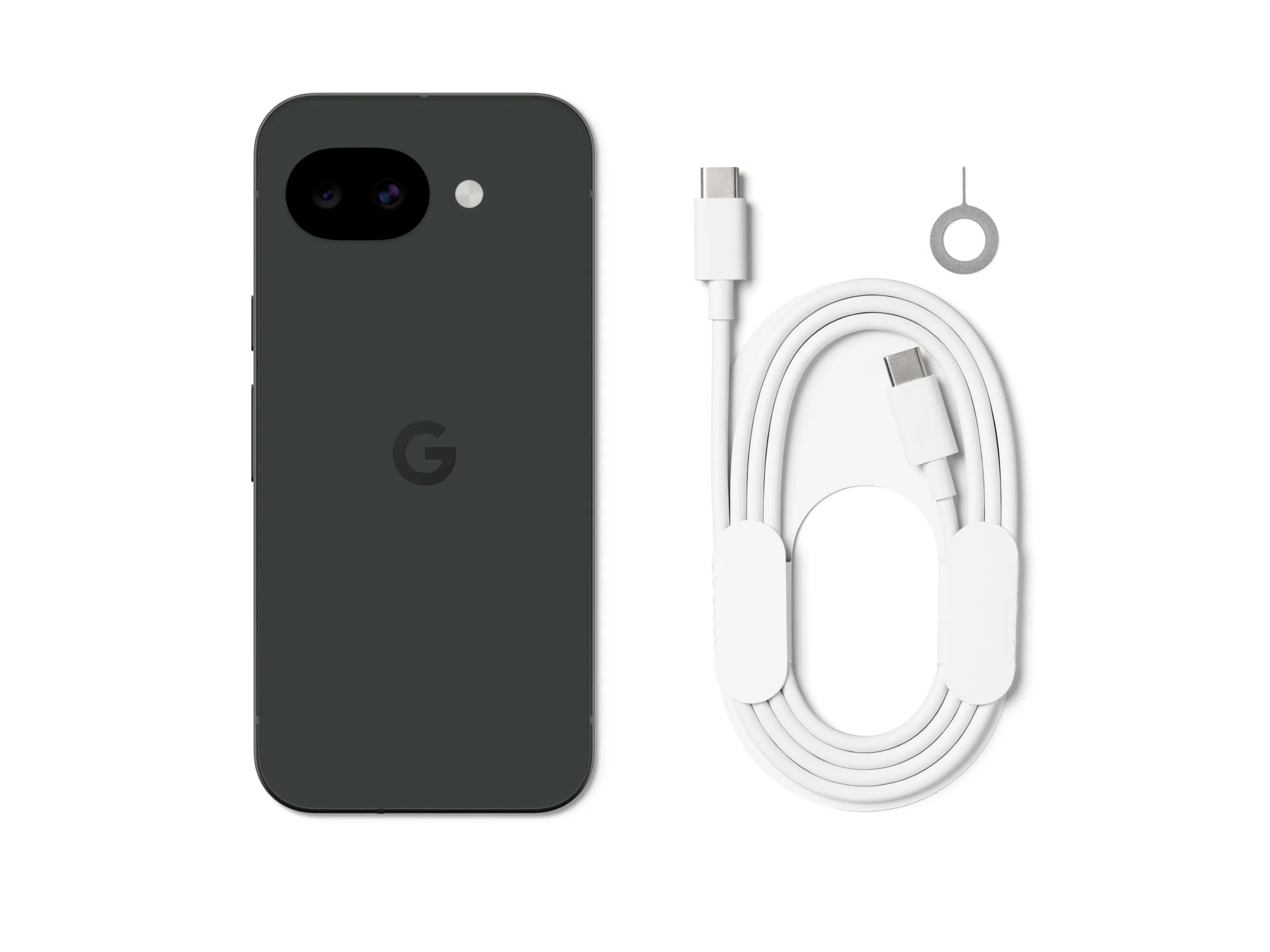
The Pixel 10a keeps a compact, flat-back design that many users prefer over bulky camera bumps. The plastic matte rear may not sound premium, but it improves grip, resists cracks, and reduces weight compared to glass-backed phones.
The 6.3-inch Actua display is a major highlight:
- Smooth 120Hz refresh rate
- Much brighter than previous A-series models
- Readable outdoors thanks to up to 3,000 nits peak brightness
Upshot: You get near-flagship screen quality without paying flagship prices.
Performance: Practical Power with Tensor G4
Rather than using the newer Tensor G5 found in the Pixel 10 flagship, Google chose the Tensor G4 for the Pixel 10a. While it won’t win benchmark battles, real-world use is smooth, stable, and well-optimized for Android 16 and Google’s AI features.
Daily tasks – social apps, navigation, photos, multitasking – run effortlessly, and Google’s tight hardware-software integration minimizes lag.
Upshot: Reliable performance that “just works,” especially for everyday users.
Camera: Still the Mid-Range Photography King
Pixel phones have long punched above their weight in photography, and the Pixel 10a continues that tradition.
Camera highlights:
- 48MP main sensor with excellent dynamic range
- 13MP ultrawide for landscapes and group shots
- AI tools like Camera Coach, Best Take, Magic Eraser, and Photo Unblur
- Strong low-light photos via Night Sight
While it lacks a telephoto lens, Google’s computational photography makes digital zoom surprisingly usable.
Upshot: One of the best phone cameras under $500, ideal for casual and social-media photography.
Battery & Charging: All-Day (and Then Some)
The 5,100mAh battery easily delivers more than a full day of use, with Google claiming 30+ hours, or up to 120 hours using Extreme Battery Saver mode.
Charging improvements over earlier A-series models include:
- 30W wired charging (up from 23W on Pixel 9a)
- 10W wireless charging, still rare at this price point
Upshot: Excellent endurance with flexible charging options.
Software & Updates: Pixel’s Biggest Advantage
The Pixel 10a ships with Android 16 and includes:
- 7 years of OS and security updates
- Built-in Gemini AI and Gemini Live features
- Advanced spam filtering, Call Screen, and safety tools like Car Crash Detection
No other phone in this price range matches Google’s update commitment.
Upshot: Long-term value and better resale potential.
A Closer Look at Pixel 10a’s Artificial Intelligence Capabilities
The Google Pixel 10a stands out in the mid‑range market because its AI features aren’t gimmicks – they’re practical tools that save time, improve photos, block spam, and make everyday phone use easier. Powered by the Google Tensor G4 chip and Gemini AI, the Pixel 10a delivers many of the same smart features found on Google’s flagship phones, but at a lower price.
Gemini AI: Your Built‑In Smart Assistant
Gemini is Google’s newest AI assistant, replacing the traditional Google Assistant on Pixel phones. On the Pixel 10a, Gemini helps you get things done using natural, conversational language.
What Gemini helps with:
- Planning schedules, reminders, and to‑do lists
- Summarizing emails or long messages
- Brainstorming ideas (work, travel, meals, projects)
- Answering questions in a more conversational way
Gemini Live lets you talk back and forth naturally, change topics mid‑sentence, and ask follow‑up questions – no rigid commands required.
Upshot: Your phone feels more helpful and less technical to use.
Circle to Search: Find Anything on Your Screen Instantly
With Circle to Search, you don’t need to switch apps or copy text. You simply circle, tap, or highlight anything on your screen, and Google instantly searches it for you.
Use it to:
- Identify products in photos or videos
- Look up landmarks or restaurants
- Translate text you see on screen
Upshot: Faster searching with fewer steps – especially useful for shopping and travel.
AI Camera Features: Better Photos Without Effort
The Pixel 10a relies heavily on AI to deliver some of the best camera results in its price range.
Key AI camera tools:
- Camera Coach: Gives real‑time tips while you’re taking a photo to improve framing and lighting
- Best Take: Combines multiple group photos into one where everyone looks their best
- Magic Eraser: Removes unwanted people or objects from photos
- Photo Unblur: Sharpens blurry photos—even old ones
- Real Tone: Accurately captures different skin tones using AI color processing
Upshot: You get great photos without learning camera settings or editing skills.
AI Call & Spam Protection Features
Google’s AI-powered Call Assist tools are some of the most useful everyday features on the Pixel 10a.
- Call Screen: AI answers unknown calls and shows you a live transcript
- Hold for Me: AI waits on hold and alerts you when someone picks up
- Direct My Call: Turns automated phone menus into on‑screen buttons
- Spam & scam detection: Automatically blocks suspicious calls and texts
Upshot: Less spam, fewer interruptions, and no wasted time on hold.
Safety & Security AI
Pixel 10a includes AI features designed to protect both your data and your safety.
- Theft Detection Lock: Automatically locks the phone if it detects snatching motion
- Car Crash Detection: Can contact emergency services if you’re in a serious accident
- On‑device security AI: Many protections run directly on the phone for faster response and better privacy
Upshot: Peace of mind without extra apps or subscriptions.
Why Pixel 10a AI Is a Big Deal for Buyers
Unlike many mid‑range phones, Pixel 10a provides:
- The same AI features as higher‑end Pixel models
- 7 years of AI, OS, and security updates
- AI that’s built into the system – not scattered across separate apps
Bottom Line: Who Benefits Most from Pixel 10a AI?
The Google Pixel 10a is ideal if you want:
- A phone that’s easier and faster to use
- Better photos with minimal effort
- Strong spam blocking and call tools
- Long-term software and AI support
Pixel 10a’s AI makes everyday phone tasks simpler, smarter, and less annoying –making it one of the smartest buys in the mid‑range smartphone market.
Comparing Pixel 10a to Previous Models (Pixel 9a & Pixel 8a)
Compared to Pixel 9a
- Same Tensor G4 chipset
- Brighter display and tougher Gorilla Glass 7i
- Faster wired and wireless charging
- Improved durability with full IP68 rating
Compared to Pixel 8a
- Larger, smoother 120Hz display
- Improved battery life
- Better AI photography features
- Two extra years of guaranteed updates
Upgrade verdict: Pixel 8a users will see meaningful improvements; Pixel 9a users may want to upgrade mainly for durability and battery gains.
Who Should Buy the Google Pixel 10a?
Buy the Pixel 10a if you:
- Want the best camera phone under $500
- Value long-term software support
- Prefer clean Android without bloatware
- Need a compact, durable phone for everyday use
Skip it if you:
- Want top-tier gaming or benchmark performance
- Need a telephoto zoom lens
- Prioritize ultra-fast charging speeds
Google Pixel 10a Key Specifications (At a Glance)
- Display: 6.3-inch Actua pOLED, 120Hz, up to 3,000 nits peak brightness
- Processor: Google Tensor G4
- RAM & Storage: 8GB RAM, 128GB or 256GB storage
- Cameras: 48MP main + 13MP ultrawide, 13MP selfie
- Battery: 5,100mAh, 30W wired + 10W wireless charging
- Durability: IP68 water/dust resistance, Gorilla Glass 7i
- Software: Android 16 with 7 years of OS and security updates
Final Verdict: Is the Pixel 10a Worth It?
The Google Pixel 10a doesn’t chase flashy specs – it focuses on reliability, camera quality, battery life, and software longevity. In a crowded mid-range market, it stands out as one of the most well-rounded smartphones of 2026.
For most users, this is exactly the kind of phone that offers maximum value with minimal compromise.
Find the smart technology that’s “just right” at your local Verizon store, shop online, or consult the friendly pros at Russell Cellular by calling 1-800-221-4408 (business customers call 1-866-326-7549).
#Verizon #5G #LTE #Fiber #GooglePixel10a #RussellCellular #BetterTogether
Check out more RC Reviews in our blog.

Jun 1, 2026
Smarter Streaming Leads to a Happier Wallet
People are noticing their streaming bills putting on a little weight these days. With so many great platforms (and their not-great monthly fees), entertainment can get pricey for many households. The good news is that Verizon streaming perks offer the easiest ways to save money on entertainment services. The bad news? There are still folks out there paying too much, more than they have to, and we’re very sad for them.
For every movie buff, sports fan, news junky, info addict, music lover, and arcade gamer, Verizon has both a will and a way to cut streaming costs without cutting must-have content.
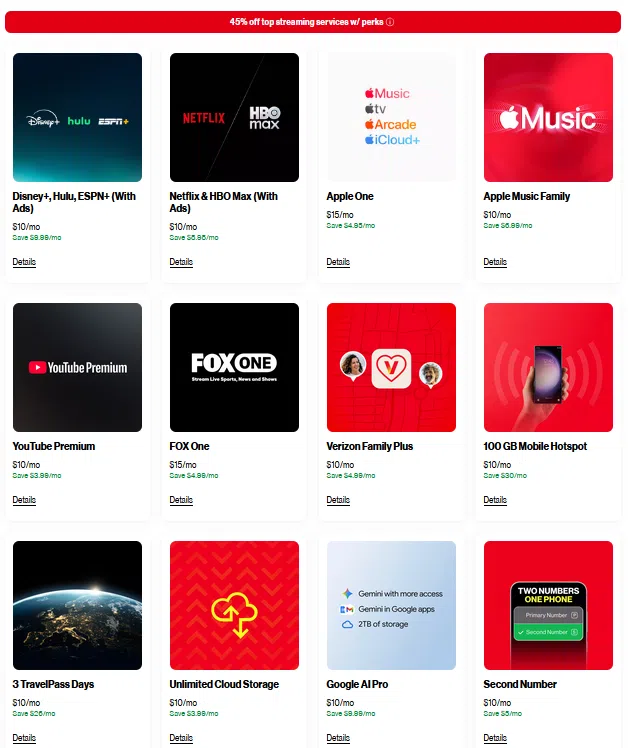
Note: Figures in the image could be inaccurate. Verify current pricing here.
Smarter Streaming Starts with Verizon Perks & an Unlimited Plan
Saving money on streaming services doesn’t require people to give up their favorite shows. With Verizon perks, customers can enjoy premium content non-stop while making their wallets happy campers too. Get the ball rolling today with Russell Cellular at your nearest store, on our website, or by calling 1-800-221-4408 (business customers call 1-866-326-7549).
Perk Up with Major Streaming Discounts
Verizon wireless customers are entitled to bonus offers or special perks regardless which “Unlimited” plan they have. One perk is available for every eligible mobile line on their account, so the savings can pile up fast. Verizon Home Internet customers have no limit on the perks they can add.
At press time, these Verizon streaming perks (and others) were available as add-ons:
- Disney Bundle (Disney+, Hulu, ESPN+) discount
- Apple Music and Apple One subscription discounts
- Netflix & HBO Max bundle discount
- YouTube Premium, Fox One, and other rotating discounts
- Google AI Pro Gemini access and storage discount
- Verizon Family Plus, 100 GB Mobile Hotspot, Verizon Cloud (Unlimited Storage), Second Number, and 3 TravelPass Days discounts
Available perks can change periodically, so doing an occasional inventory check and promotion review can be especially helpful. Customers can add or cancel perks at any time. Get all the perk details here.
Grab One Bundle to Save Another: Combine Services to Pay Less
Verizon streaming bundles are one of the most effective ways to reduce monthly costs. Verizon frequently partners with major platforms to offer bundle pricing, extended trials, or seasonal promotions.
For streamers already paying for multiple services separately, a bundle can instantly trim their bills, like this one for a limited time. (Any wallets or pocketbooks reading this are now smiling broadly.)

Watch for Limited‑Time Verizon Streaming Promotions
Verizon often runs limited‑time streaming promotions, which can include:
- Free months of premium services
- Massive introductory discounts
- Early access to new platforms
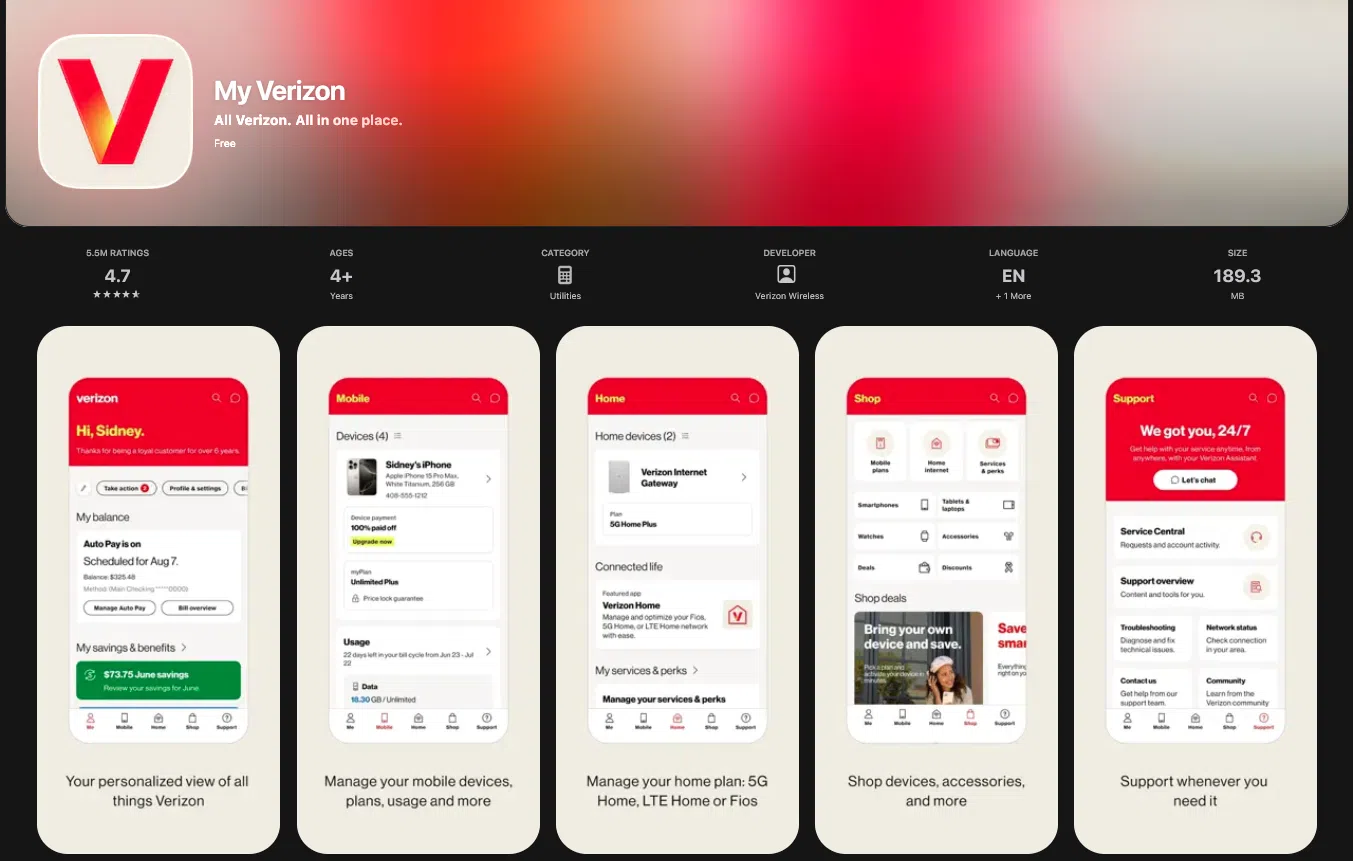
Checking the My Verizon app frequently can help customers catch these deals while they’re hot. The My Verizon app is available for free download in the App Store or at Google Play.
Do a Quick Streaming Audit (and Keep Your Favorite Perks)
Even with discounts, it’s easy to overspend on streaming. A simple audit can help everyone maximize savings. It might take a minute, but the results are almost always cost savings and peace of mind.
Try this:
- List the services you and your crew actually use and watch.
- Cancel the ones you haven’t opened in months.
- Replace paid subscriptions with Verizon‑discounted versions.
- Rotate platforms based on what you’re watching this month.
This strategy, combined with Verizon perks, can cut streaming bills by a pretty penny and stretch entertainment dollars farther than ever. Let Russell Cellular show you the way!
#Verizon #5G #LTE #Fiber #MyVerizon #VerizonPerks #VerizonStreamingPerks #VerizonStreamingDiscounts #RussellCellular #BetterTogether
Read more RC blog articles.
May 28, 2026
If you live far from city limits – under wide, star-filled skies and miles from traffic noise – you already know that peace and quiet are easy to find. A reliable home internet connection, on the other hand, can be much harder.
For households in rural and remote areas, Verizon 4G LTE Home Internet offers a dependable solution where traditional cable and fiber simply aren’t available.
Which Verizon Home Internet Services Reach Your Address?
To discover Verizon’s best internet for rural homes, simply use the Verizon Service Locator. It shows exactly which high-speed wireless internet services you can order today. There’s also a subscriber list for notifications regarding the arrival of new services in your area. (VHI blog)
To get started:
- Use the Verizon Service Locator (link above) and follow the prompts to sign up, or
- Visit a store for the right answers, connections, and one-on-one help, or
- Call Russell Cellular at 1-800-221-4408 for scheduling delivery, billing, and answering questions. (Business customers call 1-866-326-7549.)
The LTE Network: Cross Country Internet Goes Where Eagles Dare
Verizon operates the largest 4G LTE wireless broadband network in the United States, covering approximately 70% of the country’s land area and 99% of the population. While Verizon continues to expand its 5G, 5G Ultra‑Wideband, Fios, and Frontier Fiber networks, 4G LTE remains the most widely available option for many households outside urban centers.
That means depending on your location, you may have access to:
- Ultra-fast 5G or fiber internet (5G blog 2026) (Fios Blog 2026)
- Fast 5G wireless service
- Or – crucially – stable, practical 4G LTE home internet
For many rural customers, Verizon 4G LTE isn’t a backup plan – it’s the only high-quality option available today. Yet for most American households – urban or rural – LTE home internet can deliver impressive speeds and reliability for most common internet activities.
Show Me the Specs: How Fast is Verizon 4G LTE Home Internet?
4G LTE is the foundation of modern wireless communication and is more than capable of supporting everyday household internet use, even with multiple simultaneous users sharing wi-fi. Verizon 4G LTE Home Internet typically delivers:
- Average download speeds around 20 Mbps
- Peak speeds up to 50 Mbps, depending on location and network conditions
- Unlimited data – No data usage caps
To put that in perspective, HD video streaming generally requires about 5 Mbps. Verizon’s LTE speeds comfortably exceed that threshold, helping reduce buffering and maintain a smooth online experience for most activities.
What Can You Do With 4G LTE Home Internet? What CAN’T You!
Verizon’s 4G LTE network is designed to handle the daily internet needs of an average household, including:
- Streaming HD movies and TV shows
- Most online gaming
- Light to moderate remote work and video calls
- Online shopping and banking
- Research, browsing, and email
- Social media and content sharing
In many rural areas, Verizon 4G LTE Home Internet is competitive with basic wired cable services, without requiring extensive local infrastructure. Rural internet availability is important to residents and travelers alike, yet many areas have no cable internet options.
Affordable Rural Internet Now, Flexibility to Upgrade Later
Verizon 4G LTE Home Internet is often an attractive, cost-effective option, especially when bundled with Verizon wireless phone plans and discounted promotions.
As Verizon continues expanding its 5G network, customers using LTE today may have the opportunity to upgrade seamlessly when faster services reach their area – without switching providers.
A Practical and Affordable Internet Solution for Rural Living
If you live in a remote area where cable, fiber, or 5G isn’t available yet, Verizon 4G LTE Home Internet provides something essential: reliable, everyday internet access right now.
For rural residents, outdoor enthusiasts, and anyone living beyond the reach of traditional broadband, Verizon 4G LTE helps bridge the digital divide – connecting homes to work, entertainment, education, and community.
With Verizon’s ongoing investment in 5G, Ultra‑Wideband, and fiber internet expansion, coverage continues to grow. Until then, 4G LTE remains a trusted, widely available internet solution for remote homes and their happy residents.
#Verizon #Verizon4GHomeInternet #VerizonLTEHomeInternet #4G #LTE #BestInternetForRuralAreas #BestInternetForRemoteAreas #WirelessHomeInternet #RuralBroadbandAlternatives #RussellCellular #BetterTogether
See more RC blog articles.
May 14, 2026
Pristine Sound, Lasting Comfort, and Seamless Control are Key Highlights of Samsung’s Best Buds Yet
Truly great earbuds don’t scream for attention – they just work. They stay comfortable for hours, sound consistently excellent, and switch between devices without friction. That’s exactly where the Samsung Galaxy Buds4 Pro excel, and it’s why they stand as the most refined earbuds Samsung has ever produced.

Galaxy Buds4 Pro double down on what matters most in everyday use: comfort, clarity, and reliability, then add complete Galaxy ecosystem integration. The result is an earbud experience that feels effortless yet profoundly advanced.
If you want earbuds that (figuratively) disappear once you put them in – while quietly outperforming nearly everything else – Galaxy Buds4 Pro deserve a closer look and possibly an immediate purchase from Russell Cellular (find a store, shop online, or call 1-800-221-4408 for friendly help ordering; business customers call 1-866-326-7549).
Design & Comfort: Polished, Purposeful, and Built for All‑Day Wear
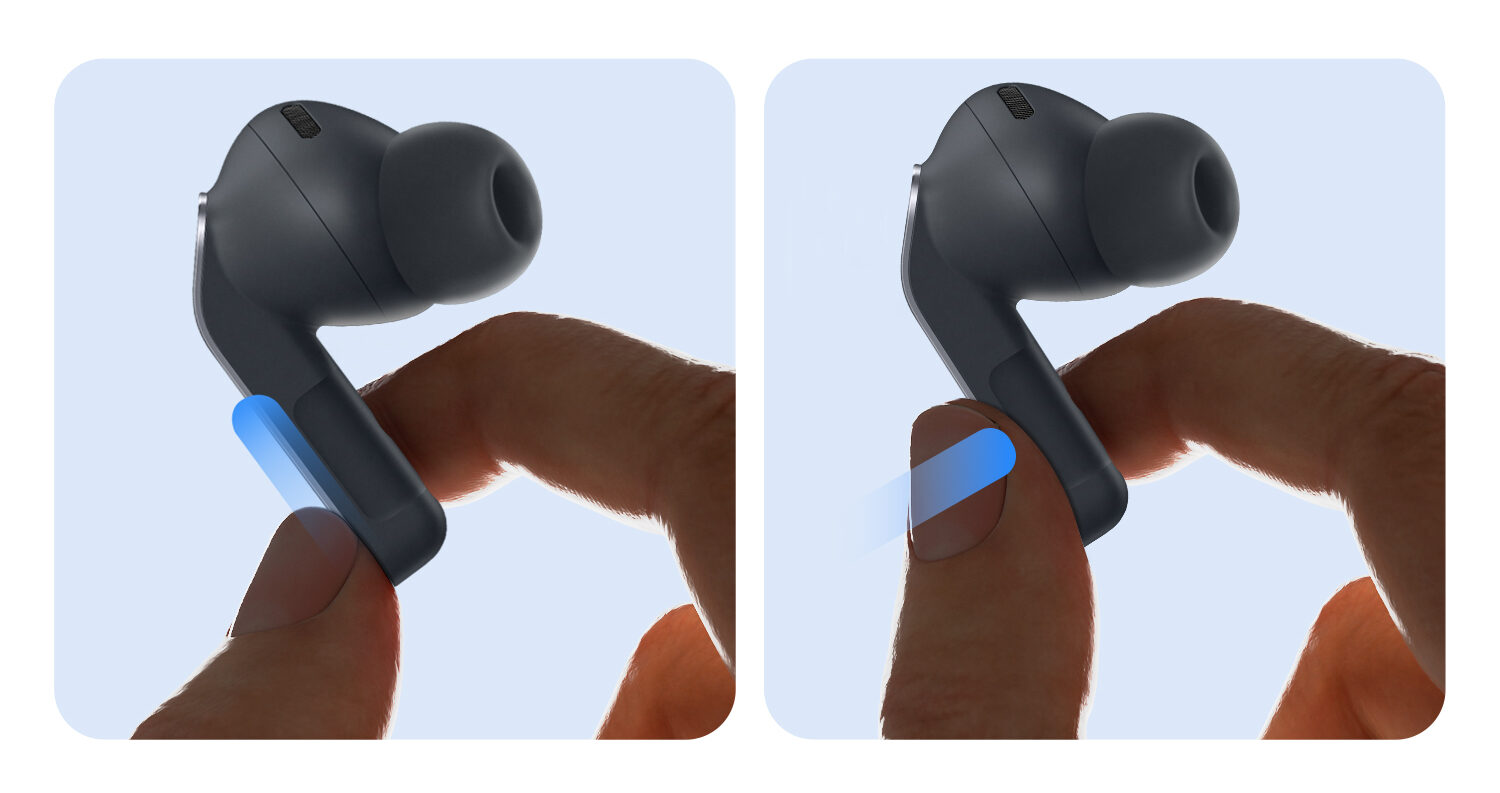
Galaxy Buds4 Pro continue Samsung’s proven canal-fit, stem‑style design, now fine‑tuned to their most comfortable and intuitive form yet. Every shape and surface feels intentionally designed for simple, responsive manual control interactions.
Key Refinements That Actually Matter
- A redesigned stem makes pinching feel easier and more natural.
- The brushed metal surface gives better grip and helps avoid accidental touches.
- Softer edges and improved airflow make the fit more comfortable and help the mic work better over time.
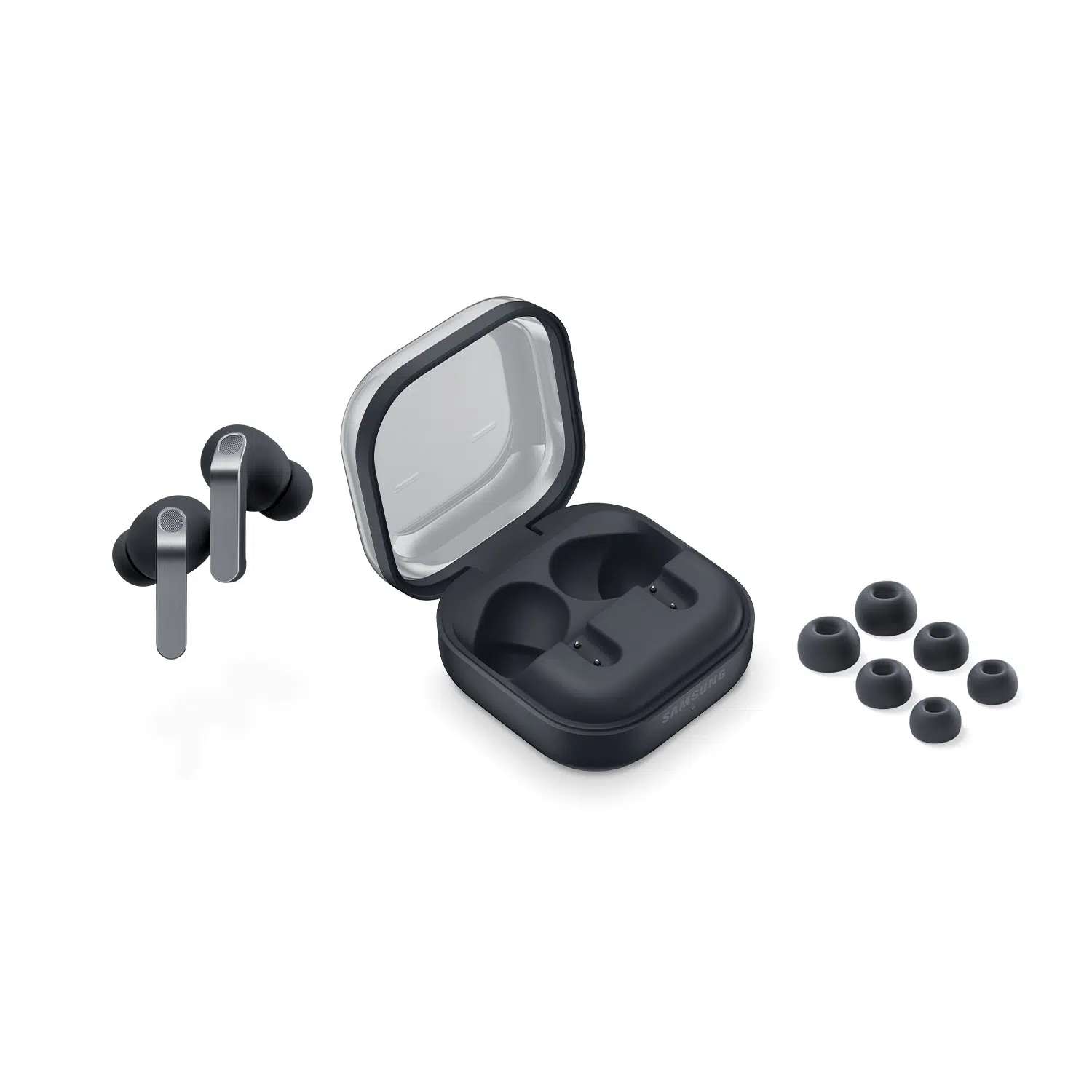
- A new flat clamshell charging case delivers enhanced durability and seamless dock‑and‑go charging for everyday convenience. Slimmer than prior models, this case rides more comfortably in pockets.
The canal‑fit design is ideal for long listening sessions, multitasking in motion, and in environments where comfort and awareness are equally important. They stay firmly seated and steadily providing, even when the bodies they’re worn by are bouncing around.
Audio Performance: Balanced, Clear, and Surprisingly Immersive
Samsung’s audio strategy with Galaxy Buds4 Pro is reliability over excess – and it hits the mark. Balancing features doesn’t mean compromise, however. Powered by precisely tuned double drivers, the Buds4 Pro deliver a sound signature that’s rich, clear, and fatigue‑free across music, podcasts, and calls.
Sound Character 
- Punchy, well‑defined bass delivers impact while staying clean and balanced.
- Clear, focused mids bring vocals and dialogue front and center.
- Crisp, airy highs add detail and openness without any sharpness.
Paired with compatible Galaxy devices, Galaxy Buds4 Pro unlock Samsung Seamless Codec (SSC UHQ) for higher‑resolution wireless audio, bringing extra depth and precision to your favorite tracks. Customers often remark that Buds4 allows them to hear their music like never before.
Call Quality: Among the Best in True Wireless
Voice clarity is one of the Galaxy Buds4 Pro’s biggest strengths – especially for people who take calls on the move. In business relationships, it’s especially important to hear spoken words in perfect clarity; tech limitations mustn’t get in the way. This Samsung upgrade is indisputably a big leap forward in audio quality and reliability.
Each earbud uses a triple‑microphone system, enhanced by Samsung’s advanced voice processing:
- Voice mics positioned closer to your mouth
- Intelligent noise reduction that isolates speech from background sound
- Automatic volume stabilization while walking or moving
- Wind noise detection for clearer outdoor calls
The result is consistently clear, confident call quality whether walking beside traffic, commuting through a storm, working outside, or hustling down a hallway to the next meeting.

Smart Noise Control That Adapts to You
Galaxy Buds4 Pro feature Adaptive Active Noise Cancellation (ANC), tuned for comfort and realism rather than artificial isolation. Users can enjoy their jams without tuning out their people or any hazards in their surroundings.
- Ambient sounds are intelligently reduced without pressure or distortion.
- Transparency mode stays natural and responsive.
- Voice Detect automatically lowers playback when you speak.
- Siren Detect automatically switches from ANC to Ambient Sound mode when it detects emergency sirens or alarms.
This adaptive approach makes Galaxy Buds4 Pro especially well-suited for offices, shared spaces, and city environments – letting you stay immersed without losing awareness. Consumer safety is always Job One in the Samsung Galaxy lineup.
Best‑in‑Class Galaxy Connectivity
Combined effort is where Galaxy Buds4 Pro truly shines. Though Galaxy Buds4 Pro can be paired with Apple and other smartphone brands, their capabilities are fully unleashed when deployed alongside other devices in the Samsung ecosystem. Synced with Galaxy smartphones, tablets, or smartwatches, the buds operate like devoted, focused teammates, combining their efforts to win for wearers. (Galaxy S26 blog) (Galaxy Z Flip7 and Z Fold7 blog) (Galaxy S25 blog)
Seamless Galaxy Integration
- Bluetooth 6.1 with LE Audio readiness
- Lightning‑fast automatic switching between Galaxy phones, tablets, TVs, and PCs
- System‑level pairing eliminates lag, reconnect delays, and app juggling
Once customers experience this level of switching reliability and personal control, perish the thought of ever going back – their standards have already been lifted, and only Galaxy Buds4 Pro will suffice thereafter.
Durability & Battery: Reliable, Predictable, Built for Real Life
Galaxy Buds4 Pro are designed to keep up with daily wear without hesitation. Earbuds that stay in place, deliver consistently no matter the wearer’s activity level, perform for hours on end, and quickly recharge are simply non-negotiable for many consumers.
Built to Last
- IP57 dust and splash resistance
- Handles sweat, workouts, and light rain with ease
- More durable in everyday environments than water‑only ratings
Battery Life (Typical Use)
- Up to 6 hours with ANC on
- Around 7 hours with ANC off
- Up to 30 hours total with the charging case
Battery performance remaining consistent day after day means users experience no unpleasant surprises and no dramatic drop‑offs. Robust batteries and rapid wireless recharging in the case have Galaxy Buds4 Pro owners listening practically non-stop, should they choose.
Should You Buy Galaxy Buds4? Obviously Yes.
Choose Galaxy Buds4 Pro if you’re in the market for:
- Exceptional all‑day comfort
- Clear, reliable call quality
- Effortless switching across Galaxy devices
- Balanced sound for music, video, and speech
- Durable design without bulk
- A polished, low‑friction user experience
Question is – Which Model to Buy: Pro or No?
Galaxy Buds4 Pro and Standard are both fantastic products, though the Pro model buds leverage more hardware and software, resulting in superior performance and greater functionality. The Pro version’s more sophisticated engineering and production costs justify the nominal price difference. Here’s $.02 from Russell Cellular, salt grain optional:
- Buy Galaxy Buds4 Pro for the best possible ANC, deeper bass, better security during mobile activities, and better water resistance.
- Buy Galaxy Buds4 (Standard) if preferences are for open-ear comfort and affordability without the need for high-level noise cancellation.
- Whichever excellent choice you make, make another by adding the best insurance protection and digital security for all your connected mobile devices in Verizon Mobile Protect Multi-Device.

Galaxy Buds4 Pro Specs at a Glance
- Drivers: 11 mm woofer plus 5.5 mm planar tweeter
- Codecs: SSC/SSC UHQ, AAC, SBC, LC3/Auracast
- Connectivity: Bluetooth 6.1
- Noise Control: Adaptive ANC 2.0 with Adaptive Mode
- Resistance: IP57 dust and water
- Controls: Touch, pinch, head gestures
- Ecosystem: Galaxy Auto Switch, Galaxy AI features for optimized sound
- Design: Stem-style, canal-fit with silicone tips
Samsung’s Most Impressive Earbuds (So Far) Excel in All the Right Ways
Samsung Galaxy Buds4 Pro aren’t trying to impress a listener in five minutes – they’re built to impress every single day! That’s a taller order to be sure, yet this product shows up for it.
By combining refined tuning, outstanding call quality, effortless Galaxy/Android integration, and long-lasting, multi-activity comfort, Samsung has delivered its most balanced, flexible, and user-friendly earbuds to date. Future releases may build on these qualities to reveal more brilliant features, but waiting around is not recommended given what the present holds!
If you want earbuds that feel genuinely finished – not experimental or overdesigned – Galaxy Buds4 Pro are an easy, enthusiastic recommendation. Add a pair to your daily ensemble and experience sound, music, and voices with whole new ears!
Satisfy your inner audiophile with Galaxy Buds4 Pro from Russell Cellular at your nearest store, on our website, or by calling 1-800-221-4408 (business customers call 1-866-326-7549).
#Verizon #5G #LTE #Fiber #Earbuds #Samsung #GalaxyBuds4 #GalaxyBuds4Pro #GalaxyEcosystem #GalaxyAI #VerizonMobileProtectMultiDevice #RussellCellular #BetterTogether
Read other RC blog articles.
Apr 13, 2026
Verizon’s 5G, 5G Ultra Wideband, and 4G LTE networks now reach most of the country and deliver solid performance for everyday online life – streaming, gaming, shopping, working, and learning.
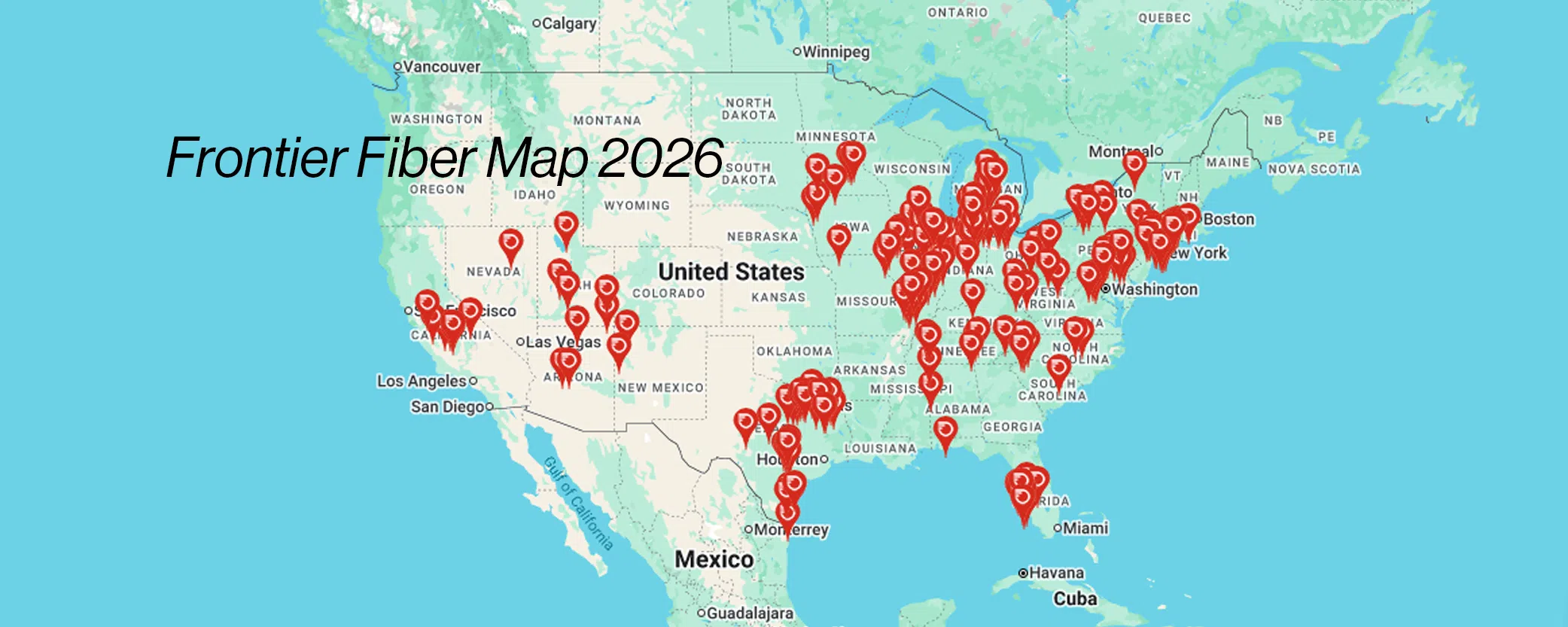
In areas where it’s available, fiber optic internet adds another option for people who want even faster speeds, ultra‑low latency, and long‑term performance built for the future. Verizon Fios and Frontier Fiber already reach millions of American homes in the Northeast, Mid-Atlantic, Midwest, and South, with expansion occurring remarkably fast in other areas as well.
Is Fiber Internet Available Where I Live?
Fiber optic internet availability depends entirely on location. It can change from one street – or even one house – to the next, so checking your specific address is essential.
The easiest way to see what’s available at your home address or business is to use the Verizon Service Locator. It shows exactly which internet services you can order today and allows you to sign up for notifications if fiber is coming soon.
To get started:
- Visit the Verizon Service Locator (link above) and prompts will lead the way, or
- Visit a store for the right answers, connections, and one-on-one help, or
- Call Russell Cellular at 1-800-221-4408 for friendly experts ready to answer questions and provide solutions. (Business customers call 1-866-326-7549.)
- You can also see the Frontier Fiber coverage map and connect with a store in your area.
What Is Fiber Internet?
Fiber optic internet – often just called fiber – uses pulses of light to transmit data through ultra‑thin strands of glass or plastic. Instead of electrical signals, information travels at the speed of light, resulting in exceptional speed and efficiency.
Verizon Fios and Frontier Fiber deliver fiber directly to the home, literally connecting a physical address to the network. Once a fiber connection is in place, it’s designed to support consistent performance, high bandwidth, and modern digital demands.
Fiber Optic Internet Benefits
Fiber is built for households that use the internet heavily and often – especially when multiple devices are online at the same time. Fiber offers some of the fastest residential internet speeds available today.
Key Fiber Benefits
- Ultra‑fast speeds, with plans reaching up to 10 Gbps
- Symmetrical upload and download speeds, great for video calls, cloud backups, and content creation
- Low latency and stable performance, even during busy times
This makes fiber a strong choice for streaming in 4K, competitive gaming, working from home, online learning, and smart‑home technology.
When Will Fiber Internet Availability Occur Locally?
If Verizon Fios or Frontier Fiber isn’t available at your address yet, don’t worry – expansion is ongoing. Rolling out fiber nationwide takes time, and new neighborhoods are added every year. When fiber does arrive, you’ll have access to one of the fastest and most capable home internet technologies available.
#Verizon #VerizonFios #Fios #FrontierFiber #VerizonHomeInternet #RussellCellular #BetterTogether
Check out other RC blog articles.
Apr 10, 2026
Expand Your High-Tech Ecosystem on the Cheap
Looking for the best Verizon deal right now? With Verizon’s Buy More, Save More promotion, qualifying customers can get a tablet or smartwatch for as low as $0 per month when they purchase any smartphone on a device payment plan. It’s a limited‑time opportunity to grow your connected ecosystem – without boosting your budget.
Through April 22, 2026, you can upgrade or add a new phone and enjoy massive savings on an Apple or Samsung tablet or watch, all on Verizon’s fast, reliable network. (VHI 5G blog) (VHI Fiber blog) Whether you’re boosting productivity, tracking fitness, or staying connected on the go, this deal makes it easy – and affordable – to add the device you actually want.
Selecting the Right Device to Add to Your Ecosystem – for Next to Nothing
Smartwatches are stylish, comfortable, convenient wearable “smartphone siblings” that offer quick access to apps, music, maps, and payment options, plus a host of fitness metrics, sleep analysis, ECG, blood oxygen monitoring, and more.
Tablets are versatile hybrids between laptops and smartphones, making them ideal for on-the-go productivity, creative work, entertainment, and social connectivity.
Either is certain to enhance one’s lifestyle, functionality, and fashion – inexpensively via this “ending soon” offer.
Choose a Verizon $0 Smartwatch Bundle OR a Verizon $0 Tablet Bundle
As for connecting devices on Verizon’s fast, reliable 5G, LTE, and fiber networks, building a Galaxy ecosystem or Apple ecosystem requires matching devices for Buy More Save More eligibility in this special offer for new or existing customers.
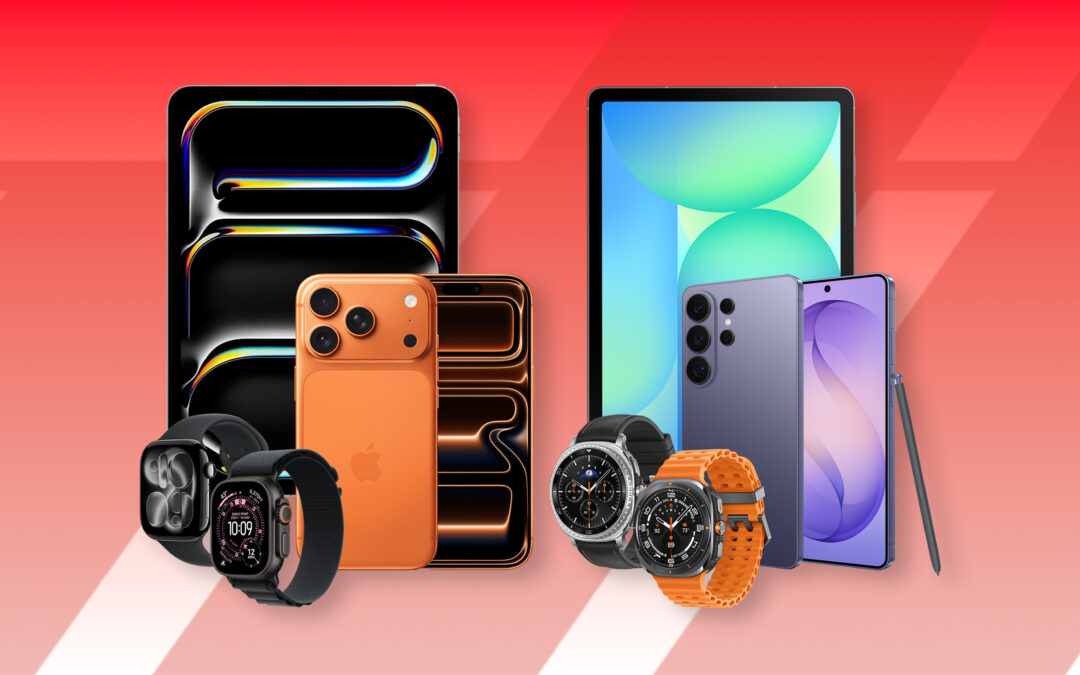
- Upgrading or purchasing an Apple iPhone allows buyers the choice of iPad (tablet) or Apple Watch for $0/mo.
- Upgrading or purchasing a Samsung Galaxy smartphone offers the choice of a Samsung tablet or Samsung Galaxy Watch for $0/mo.
Or Take BOTH Connected Devices – One for $0/mo, One at a Big Discount
For an even greater enhancement to your Galaxy or Apple ecosystem, Verizon makes it easy to add both a smartphone and a tablet for ultimate connectivity. During the limited-time Buy More, Save More promotion, qualifying phone buyers/upgraders receive the first device for free and a bundle discount on the second device. Your local Russell Cellular experts can help you find the most savings from these offers:
-
- Apple Ecosystem: Get a $0/mo iPad and up to $250 off an Apple Watch, OR a $0/mo Apple Watch and up to $320 off an iPad.
- Samsung Ecosystem: Get a $0/mo Samsung tablet and up to $250 off a Samsung watch, OR a $0/mo Samsung watch and up to $420 off a Samsung tablet.
Important Notes on this $0/mo Tablet or $0/mo Smartwatch Deal
- Smartphone purchase can be a new line or upgrade.
- Connected device requires a new line of service.
- Devices must be in the same ecosystem (e.g., iPhone with an iPad, or Galaxy with a Samsung tablet)
- Buyers can add peace of mind to their purchases with Verizon Mobile Protect or Verizon Mobile Protect Multi-Device for proactive security, tech support, and all-in-one insurance coverage. (VMP blog)
Don’t Dawdle (Unless You’re Into Overspending) – Expires 4/22/26
Russell Cellular, an authorized Verizon retailer, invites new and current upgrade-ready customers to visit a store, shop online, or call 1-800-221-4408 for friendly help ordering (business customers call 1-866-326-7549). This special offer runs only through April 22, 2026, so start shopping or make an appointment with your genuinely caring RC expert today!
#Verizon #5G #5GUW #LTE #Broadband #Wireless #Fiber #BuyMoreSaveMore #SmartphoneDeal #SmartwatchDeal #TabletDeal #SamsungEcosystem #GalaxyEcosystem #AppleEcosystem #RussellCellular #BetterTogether
Read other RC blog articles.