Oct 9, 2026
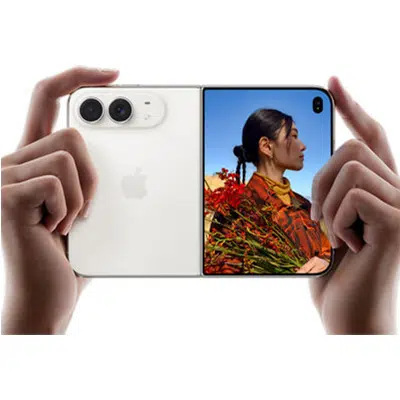
Apple is nearing its official entry into the foldable smartphone market with the all-new iPhone Duo, and it’s already generating plenty of excitement. For years, iPhone users have watched foldable devices evolve from the sidelines. Now Apple has delivered its own take on the category, combining a familiar iPhone experience with an expansive folding display, powerful cameras, and Apple Intelligence features designed to help users get more done.
But is the new Apple iPhone Duo the future of smartphones, or just another premium device with a premium price tag? Let’s explore the iPhone Duo’s specifications, standout features, Apple Intelligence capabilities, and who should consider making the switch.
For one-on-one help from a genuinely caring, qualified expert, call us at 1-800-221-4408 or stop by your local Verizon store. Pre-orders for the iPhone Duo begin Friday, October 16, 2026, while the in-store release is set for October 23.
Apple iPhone Duo Specifications at a Glance
Before diving into the details, here’s a quick overview of what’s powering Apple’s newest flagship foldable.
Key Specifications
- 7.9-inch Super Retina XDR foldable display
- 6.4-inch Super Retina XDR cover display
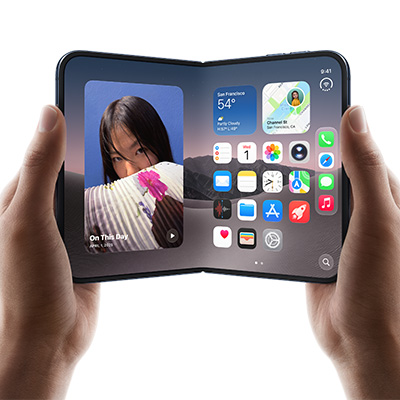
- ProMotion technology with up to 120Hz refresh rate
- Apple A20 Pro chip
- 12GB RAM
- Available in 256GB, 512GB, and 1TB storage options
- 48MP Fusion main camera
- 48MP ultra-wide camera
- 12MP telephoto camera with 5x optical zoom
- 12MP TrueDepth front camera
- Up to 30 hours of video playback
- USB-C fast charging and MagSafe wireless charging
- iOS 27
- IPX8 water resistance
- Starting around $1,999.99
What Makes the Apple iPhone Duo Different?
Truth is, the iPhone Duo isn’t trying to replace your current iPhone. It’s trying to replace multiple devices.
Think of it as an iPhone, an iPad mini, a productivity tool, an entertainment hub, and an Apple Intelligence assistant all folded into a single device that still fits in your pocket.
That’s really the story of the iPhone Duo.
Apple didn’t simply build a folding screen; it built a larger canvas for everything people already do on their iPhones.
Whether you’re responding to work emails, editing documents, watching movies on flights, participating in video meetings, or managing a busy schedule, the Duo gives you significantly more room to work with.
 Five Reasons the iPhone Duo Stands Out
1. A Bigger Screen That Changes How You Use Your Phone
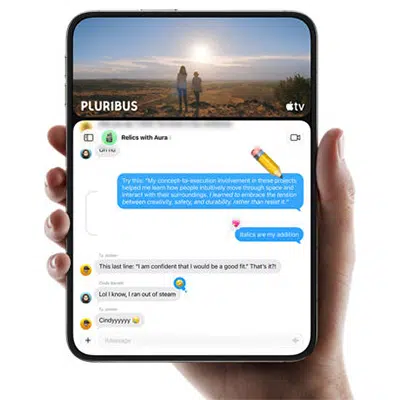
The headlining feature is obviously the nearly 8-inch foldable display.
When closed, the iPhone Duo feels familiar and easy to use. Open it up, however, and it transforms into a tablet-like experience that creates entirely new possibilities for productivity and entertainment.
Why You’ll Notice the Difference
- View documents without endless zooming
- Work in multiple apps at the same time
- Enjoy more immersive streaming and gaming
- Read articles and ebooks more comfortably
- Experience more natural video calls
The extra screen space isn’t just about size. It’s about flexibility, comfort, and usability.
2. Multitasking Finally Feels Practical
Many smartphones claim to support multitasking. The iPhone Duo is one of the few devices that genuinely makes multitasking useful.
Imagine reviewing a presentation while referencing a spreadsheet.
Or participating in a Teams meeting while taking notes.
Or comparing travel plans alongside your email confirmations.
The larger display gives users room to work rather than constantly switching between apps and windows.
For business professionals, students, and remote workers, that alone could justify the upgrade.
3. Apple Intelligence Has Room to Shine
Apple Intelligence is one of the iPhone Duo’s biggest advantages.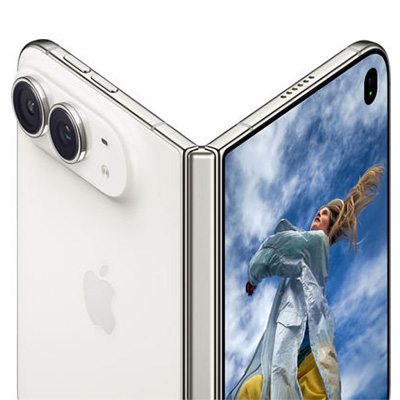
While many AI features are available across Apple’s ecosystem, the Duo’s larger display makes them significantly easier to use in real-world situations.
Apple Intelligence Can Help You
- Summarize lengthy emails
- Rewrite messages in different tones
- Create meeting notes
- Generate document summaries
- Organize tasks and schedules
- Find important information faster
The ability to view AI-generated content alongside your source material creates a workflow that feels far more productive than on a traditional smartphone.
4. Professional-Grade Cameras Built for Creators
Apple didn’t cut corners on the camera system. Samsung’s Galaxy Z Fold 8 Ultra sports a slightly superior system, but out of the gate the Duo is clearly up to the task.
The iPhone Duo includes a flagship-level camera setup designed for photography enthusiasts, content creators, and everyday users who simply want great-looking photos.
Photography Highlights
- 48MP Fusion camera for outstanding detail
- 48MP ultra-wide lens for landscapes and group photos
- 5x optical zoom telephoto lens
- Improved low-light performance
- Advanced computational photography features
The foldable design also introduces creative shooting options, allowing the phone to act as its own stand for hands-free photography, video recording, and video calls.
5. A Foldable Designed Around the Apple Ecosystem
 One of Apple’s biggest strengths continues to be ecosystem integration.
The iPhone Duo works seamlessly alongside:
- Apple Watch
- AirPods
- Mac
- iPad
- Apple Intelligence
- iCloud services
For existing Apple users, the transition feels natural because the Duo still behaves like an iPhone, just way more versatile.
Apple iPhone Duo Buyer’s Guide: Who Is It Really For?
The iPhone Duo isn’t for everyone, and that’s okay.
You’ll Love the iPhone Duo If:
- You regularly multitask between apps
- You want a phone and tablet in one device
- You travel frequently
- You use Apple Intelligence features often
- You’re invested in the Apple ecosystem
- You value productivity as much as entertainment
You Might Prefer an iPhone 18 Pro Max If:
- You prioritize value
- You prefer traditional smartphone designs
- You mainly use your phone for texting, social media, and calling
- You want a lighter, more compact device
- You don’t need foldable features

Final Verdict, Says Us.
The Apple iPhone Duo isn’t simply a new iPhone. It’s Apple’s vision for what a premium smartphone can become when productivity, entertainment, and AI are given room to work together.
Its biggest advantage isn’t the foldable screen itself. It’s what that larger display enables. Better multitasking. More effective Apple Intelligence features. Improved content creation. Easier document management. And a phone-and-tablet experience in a single device.
For power users, professionals, frequent travelers, and dedicated Apple fans, the iPhone Duo may be the most exciting iPhone release in years! For everyone else, it’s an impressive glimpse at where mobile technology is headed next.

Can’t Wait? Us Neither.
When the Duo premieres in stores, Russell Cellular’s wireless experts will be ready to help you connect to Apple’s impressive foray into the foldable market. Call us at 1-800-221-4408 or stop by your local Verizon store. Pre-orders for the iPhone Duo begin Friday, October 16, 2026, while the in-store release is set for October 23.
#AppleiPhoneDuo #iPhoneDuo #AppleIntelligence #FoldablePhone #iPhoneReview #BuyersGuide #RussellCellular #AppleFans #TechReview #VerizonAuthorizedRetailer
Read more RC Previews & RC Reviews on our blog.
Sep 18, 2026
Prognosticating Coffee Talk: Who Has the Best AirPods?
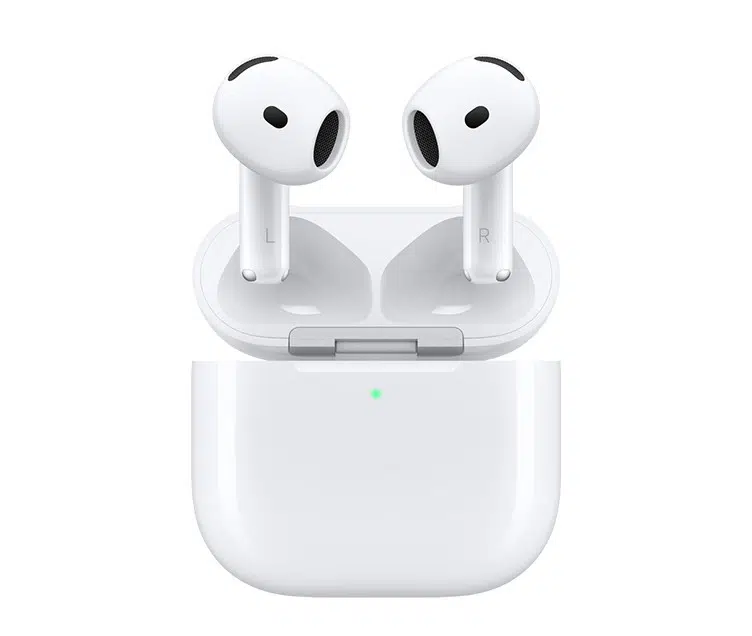
Russell Cellular is pleased to bring you this imaginative exchange – or is it a factual foretelling – enlivened by a playful troupe for the theater of your mind. Readers may gain a better understanding of AirPods 3 and the new AirPod 5 models along the way. Enjoy!
For one-on-one help, consult a genuinely caring expert at your nearest Russell Cellular store or by calling 1-800-221-4408. The Apple Airpods 5 were released September 18, 2026.
Emma, you’re still hanging onto those AirPods 3?
- Proudly. Unlike certain people, I don’t upgrade every time Apple changes a number.
HA! That’s a laugh – AirPods 5 are fantastic!
- I’m sure they are. But when I compared the specs side-by-side, I was reminded why I kept my 3s.
Here we go.
- Seriously. I use Active Noise Cancellation all the time. On flights, in coffee shops, when I’m trying to focus at work. That’s probably the single most important feature for me.
Fair point. The AirPods 5 seem more focused on everyday convenience and sound quality than maximum noise blocking, although it’s still impressive.
I will admit, if someone spends a lot of time traveling or working in noisy environments, stronger ANC would be hard to pass up.
- Exactly. Last month I was on a three-hour flight, and once I turned ANC on, most of the engine noise practically disappeared. Way less stressful for me!
I mostly use mine while walking Sadie, driving to work, or relaxing at home. My 5s are kind of perfect for all that!
- What’s better since your last ones, Ashley?
The sound just feels more refined. Podcasts are clearer, and music has more depth. Plus they’re super comfortable.
And they’re seamless. Yesterday I finished a meeting on my MacBook, closed it, and my music picked up on my phone immediately. No effort.
- AirPods have always been good at that!
True, but everything feels faster and smoother with these.
- No surprise there, Diane – every new generation feels more refined and polished!
That charging case seemed like an unnecessary luxury when I bought my 5s.
- But you’re actually good at remembering to keep your stuff charged up.
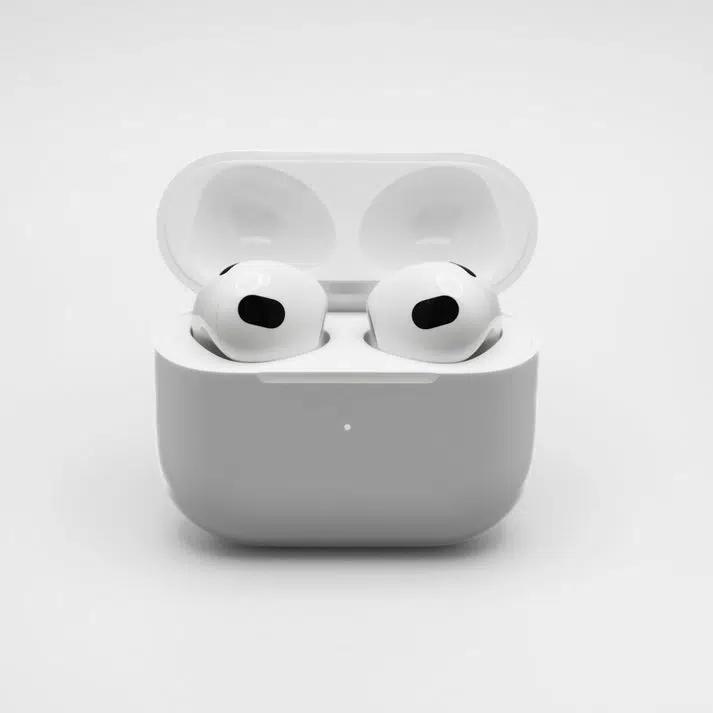 Oh yeah! The case is a lifesaver! Last weekend I was out almost all day and half the night. Between the earbuds and the case’s extra battery, I never worried about power.
- I can see the appeal for sure!
–Honestly, I think the AirPods 5 are aimed at people who want most of the premium experience without spending top-tier money.
- And that’s where they make a lot of sense.
Wait, are you actually complimenting them?
- Of course! I honestly think they’re probably the better value for most people.
Especially students or anyone upgrading from older earbuds!
- Exactly. If someone doesn’t “have to have” top-tier noise cancellation, the AirPods 5 are an easy recommendation. Better sound, smart features, good battery life, and a lower price.
So you’re not tempted?
Not even a little?
- Here’s the thing. If I were buying today and trying to save money, I’d probably look hard at the AirPods 5. You guys definitely seem thrilled, plus they’re reasonably priced.
Preach, girl!
- But I already own AirPods 3, and the stronger ANC, travel-friendly features, and premium extras are things I use every single day. For me, that’s worth the higher cost I already paid.
Well, fine then. That’s actually a reasonable take.
Wow. We finally found someone who doesn’t have upgrade fever!
- Shocking, right? Gorgeous and rational – who’d have thought.
So your verdict is AirPods 5 for value, AirPods 3 for people who prioritize ANC?
- Pretty much. Different ‘pods for different peeps, I always say.
That’s probably the most sensible thing anyone has said about Apple products.
- Don’t tell anyone. It would ruin my reputation!
Deal. Now let’s get back to work.
Before Emma starts a presentation about responsible spending.
- Too late. Slide one: “Why Keeping Your Existing AirPods Is Sometimes the Smartest Upgrade.”
Final Verdicts
Diane: “For me, the AirPods 5 with the Charging Case are the winner. The sound quality is excellent, device switching is effortless, and the charging case means I never worry about battery life. If you want the best balance of features, convenience, and value, this is the one I’d buy.”
Ashley: “The AirPods 5 are the sweet spot in Apple’s lineup. You get a modern listening experience, great comfort, smart features, and strong overall performance without paying as much as the higher-end models. They’re the best choice for most everyday users.”
Emma: “I’m sticking with my AirPods 3. The superior Active Noise Cancellation, travel-friendly features, and premium extras are things I use all the time. Yes, they cost more, but for frequent travelers and people who want the most immersive listening experience, I still think they’re worth it. If I were buying on a tighter budget, I’d recommend the AirPods 5. But since I already have the 3s, I have no reason to switch.”
Quick Verdict
| User |
Recommendation |
| Diane |
AirPods 5 with Charging Case because of the convenience, battery flexibility, and strong feature set. |
| Ashley |
AirPods 5 because they deliver the best balance of performance and affordability. |
| Emma |
AirPods 3 because the superior ANC and premium features justify the higher price for her needs. |
Overall Winner by Category
🏆 Best Value: AirPods 5
🏆 Best Convenience: AirPods 5 with Charging Case
🏆 Best Premium Experience: AirPods 3
🏆 Best for Frequent Travelers: AirPods 3
AirPods Comparison Chart
| Feature |
AirPods 5 with Charging Case |
AirPods 5 |
AirPods 3 |
| Target User |
Everyday users who want maximum convenience |
Value-conscious users seeking new features |
Users who prioritize premium features and stronger ANC |
| Sound Quality |
Excellent, enhanced clarity and bass |
Excellent, enhanced clarity and bass |
Excellent, slightly more immersive due to ANC |
| Active Noise Cancellation (ANC) |
Basic/Adaptive noise management |
Basic/Adaptive noise management |
Superior ANC for blocking outside noise |
| Transparency Mode |
Yes |
Yes |
Advanced Transparency Mode |
| Calls & Voice Isolation |
Improved voice isolation |
Improved voice isolation |
Excellent call quality with advanced processing |
| Comfort |
Lightweight, comfortable all-day fit |
Lightweight, comfortable all-day fit |
Comfortable with premium fit and seal |
| Battery Life (Earbuds) |
Long-lasting |
Long-lasting |
Long-lasting |
| Extra Battery from Case |
✅ Yes, multiple recharges |
❌ Not included |
✅ Yes |
| Travel Friendly |
Very good |
Good |
Excellent |
| Apple Ecosystem Integration |
Seamless |
Seamless |
Seamless |
| Device Switching |
Fast and automatic |
Fast and automatic |
Fast and automatic |
| Spatial Audio |
Yes |
Yes |
Yes |
| Value for Money |
★★★★★ |
★★★★★ |
★★★★☆ |
| Premium Features |
★★★★☆ |
★★★☆☆ |
★★★★★ |
| Price |
Mid-range |
Lowest of the three |
Highest of the three |
| Best Reason to Buy |
Convenience and all-day battery confidence |
Best overall value |
Strong ANC and premium listening experience |
As the three coworkers ultimately agree, there isn’t a single “best” model. The AirPods 5 family offers the strongest value proposition for most buyers, while the AirPods 3 remain the better choice for people who place a premium on stronger noise cancellation and a more feature-rich listening experience.
Get the best advice, support, and deals at your nearest Russell Cellular store or by calling 1-800-221-4408 today!
Jul 20, 2026
How Smartphones, Connected Devices, and Accessibility Apps Are Empowering Independence
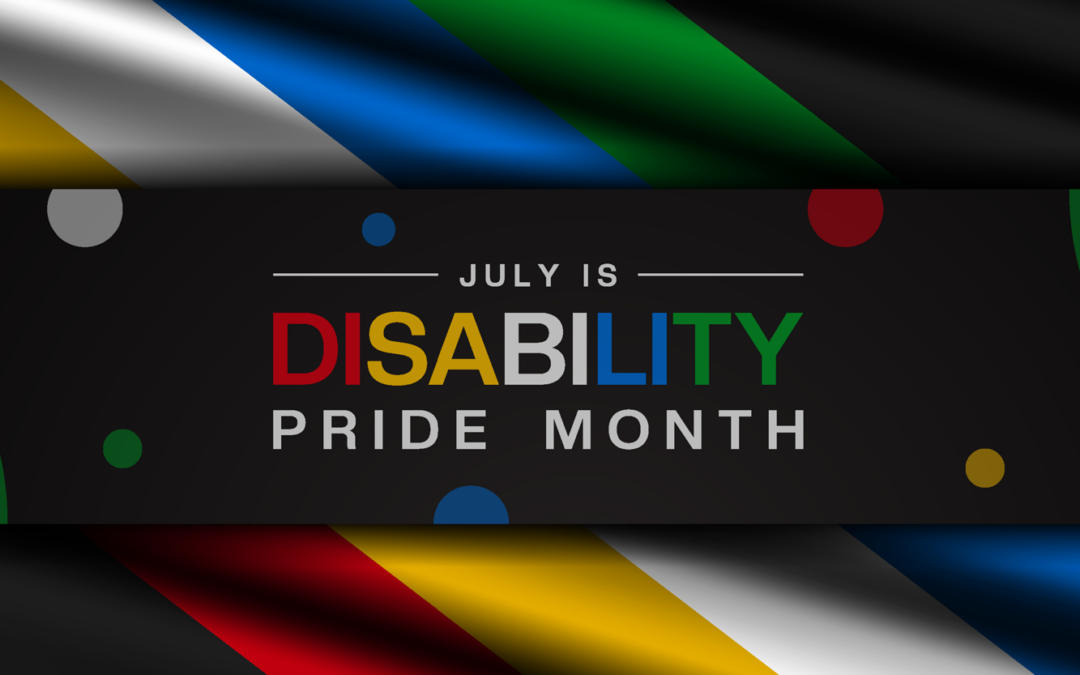
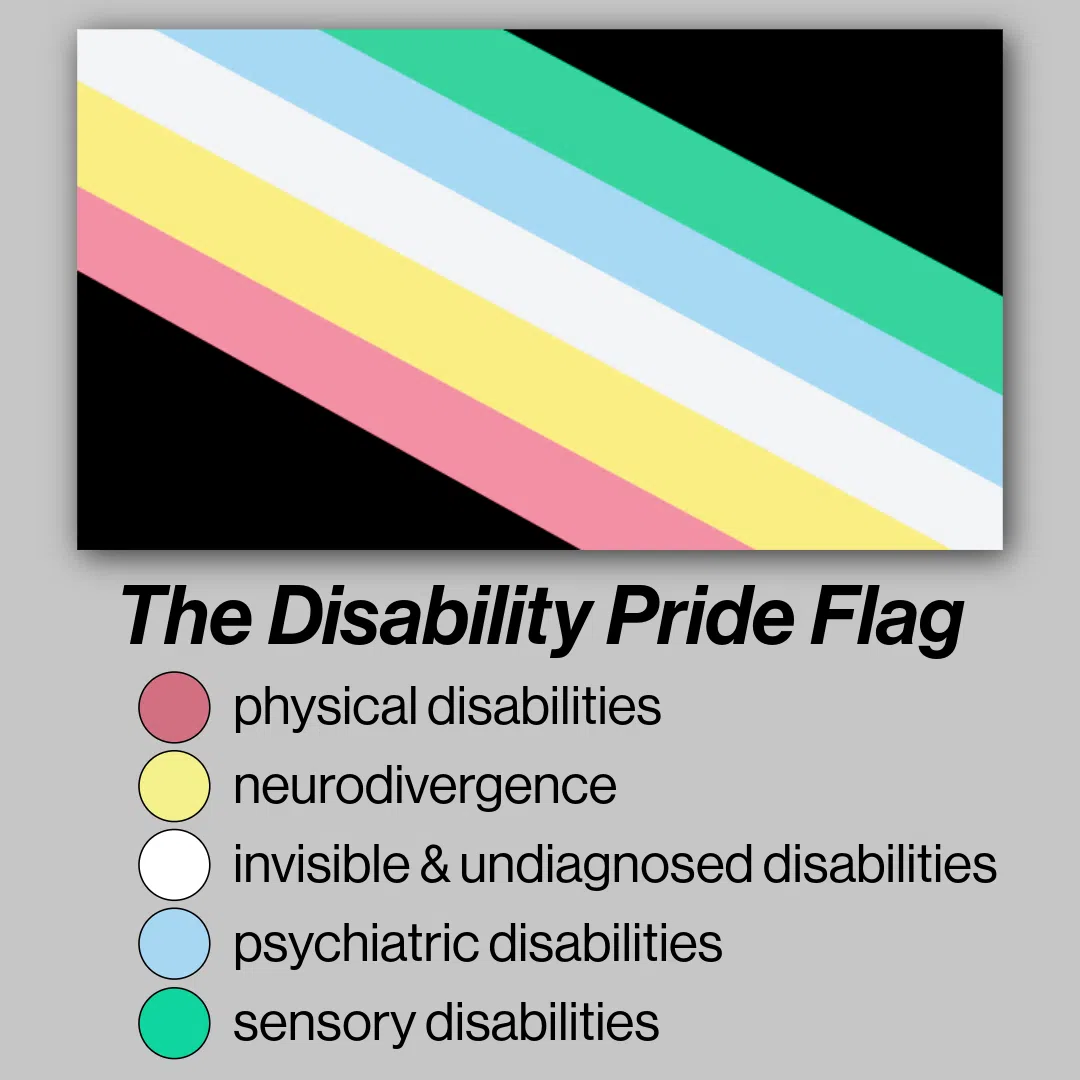
Every year since July 26, 1990, when the Americans with Disabilities Act (ADA) was signed into federal law, states and communities across the nation observe Disability Pride Month in July, honoring the achievements, identities, and contributions of people with disabilities while promoting a more inclusive society. It is also an opportunity to appreciate how technology has transformed everyday life in our country.
Today’s smartphones and connected wireless devices are far more than communication tools – they are powerful accessibility platforms that help people navigate the world, communicate, work, learn, and live more independently.
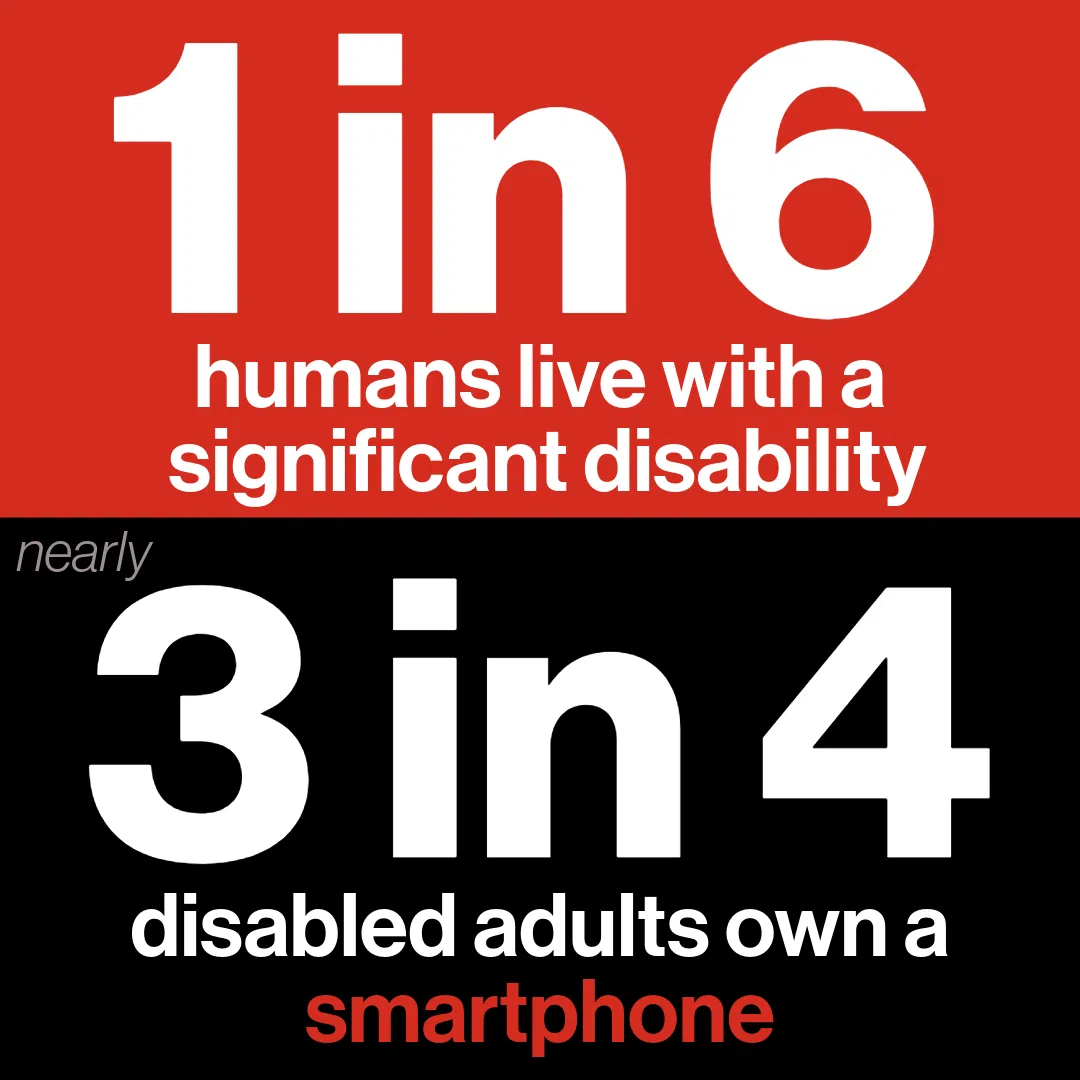
According to the World Health Organization, an estimated 1.3 billion people worldwide – roughly 1 in 6 people – live with a significant disability, making accessibility an essential component of modern technology rather than a niche feature. For one-on-one help, consult a genuinely caring Russell Cellular expert at your nearest location or by calling 1-800-221-4408.
Accessibility Built into the Devices We Use Every Day
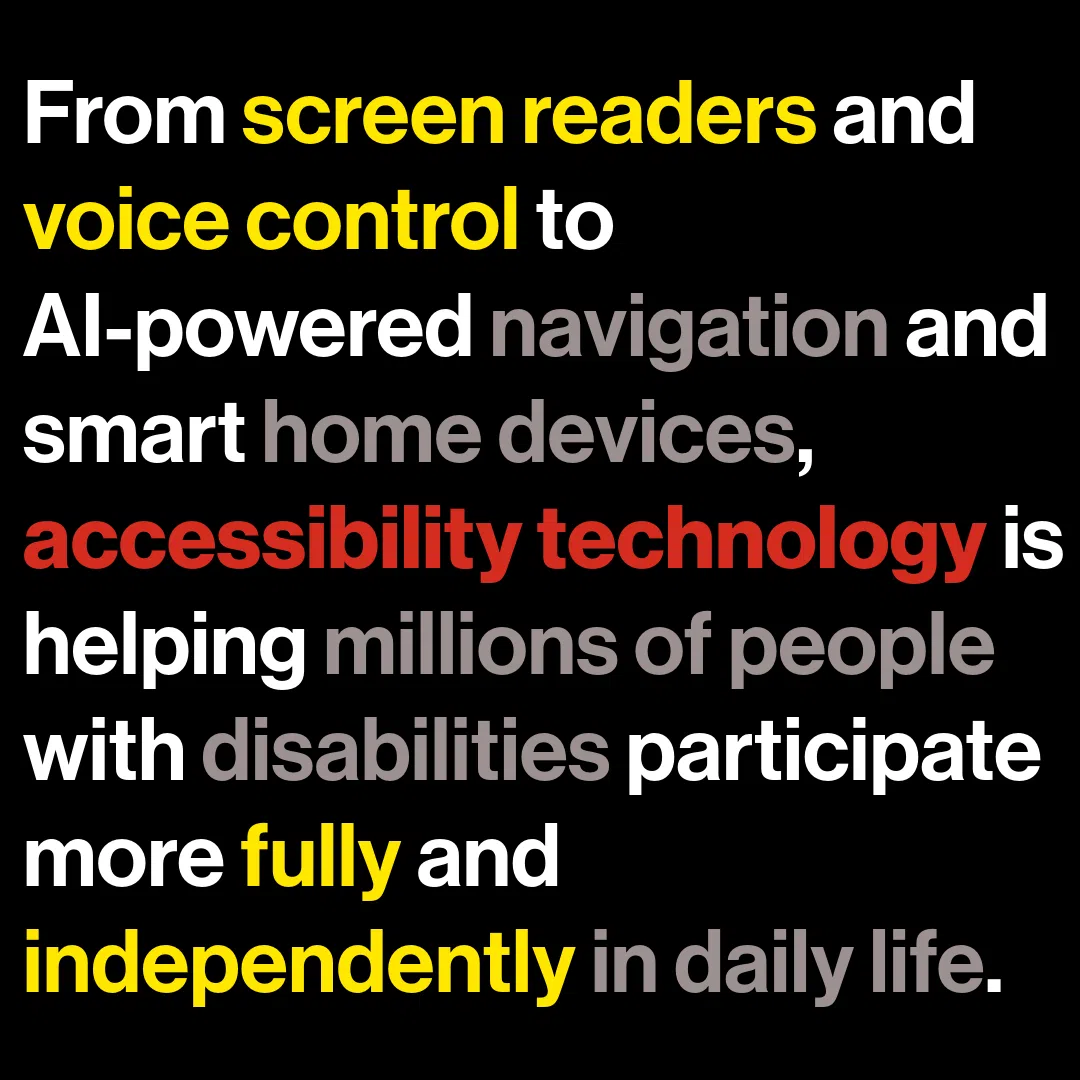
Just a decade ago, many people with disabilities relied on expensive, specialized assistive technologies. Today, many of those capabilities are built directly into smartphones, tablets, smartwatches, and wireless earbuds.
Tip: Learn how to use your device’s built-in assistive technology at the Verizon Accessibility Resource Center.
For Individuals with Visual Impairments
Screen readers can convert on-screen content into spoken feedback, allowing users to send messages, browse the web, and access apps independently. Magnification tools, color filters, and text resizing features help users customize displays to meet their visual needs.
Most smartphones today include built-in screen readers (like Apple’s VoiceOver or Google’s TalkBack), magnification, and high-contrast color modes. Apps like Be My Eyes and Seeing AI use the camera to describe surroundings or read text aloud.
For People with Hearing Impairments
Smartphones offer real-time captioning, sound recognition, visual alerts, and seamless compatibility with hearing devices. The popularity of captions demonstrates how accessibility innovations often benefit everyone. Research shows that 80% of people who use captions do not have a hearing impairment, illustrating how features originally designed for accessibility have become mainstream tools.
For Individuals with Mobility and Dexterity Issues
Accessibility features are equally transformative. Voice control allows users to operate a device without touching the screen, while customizable gestures, switch controls, and eye-tracking technologies provide alternative ways to interact with digital content.
Switch Control allows the use of external adaptive switches, head-tracking hardware, or facial expressions to navigate. Voice Assistants like Siri or Google Assistant allow complete hands-free control of the device, reducing barriers for people with limited dexterity or other physical disabilities.
For People with Cognitive Challenges
Features like Guided Access (on iOS) lock the phone to a single app to prevent distractions or accidental purchases. Simplified launchers and picture-dialing interfaces can remove complicated menu layouts.
Smartphones are Commonplace but not Everywhere
Smartphones and tablets have become a vital access point to education, employment, healthcare, transportation, and social connection. A recent survey by the Pew Research Institute indicates 72% of adults with disabilities report owning a smartphone, demonstrating how mobile technology has become a critical gateway to digital accessibility. Clearly, there is room for growth, though – 28% of disabled adults without a smartphone means many people are not experiencing the useful features which might improve their lives in myriad ways.
While a digital divide still exists, the widespread adoption of smartphones has given millions of people access to built-in accessibility tools that previously required separate devices or specialized software. And happily, efforts are underway in both private and public sectors to diminish the gap so that smart technology is within reach of more adults and children living with disabilities.
The Ecosystem of Connected Wireless Devices is Ever-Expanding
Accessibility innovation extends far beyond the smartphone itself. Connected wireless devices have created an ecosystem that supports independence throughout the day.
Smartwatches provide discreet reminders for medication, appointments, and daily routines. They can detect falls, monitor health metrics, and alert caregivers or emergency contacts when assistance may be needed.
Wireless earbuds, headphones, and hearing-assistance technologies are also evolving rapidly. Features such as amplified conversations, customizable audio settings, and environmental sound awareness can help users better engage with the people and environments around them.
Smart home devices further demonstrate how wireless connectivity can improve accessibility. Voice assistants can control lights, thermostats, locks, and appliances through simple spoken commands. For someone with limited mobility, these capabilities can make everyday tasks significantly easier and reduce dependence on others.
Disability-Focused Apps Are Expanding Possibilities
While built-in accessibility features provide a strong foundation, disability-related apps are extending those capabilities in remarkable ways.
Communication Apps
These help individuals with speech disabilities express themselves through text-to-speech technology, symbol-based communication systems, and customizable communication boards. These tools support meaningful interactions at school, work, healthcare appointments, and social gatherings. Examples (no endorsement implied):
Vision & Sensory Support
Be My Eyes: Connects blind or low-vision users with sighted volunteers or an AI assistant via video call to read labels, navigate spaces, or identify objects.
Google Live Transcribe: Delivers real-time, highly-accurate speech-to-text transcription for people who are deaf or hard-of-hearing.
Speech & Augmentative/Alternative Communication (AAC)
Proloquo2Go: A powerful AAC app that provides customizable voice and symbol-based communication system for non-verbal individuals.
Grid for iPad: Highly adaptable software with picture scenes and core vocabulary tailored for kids, teens, and adults.
Others: TouchChat, Lamp Words for Life
Mobility & Navigation Apps
These are designed for people with visual impairments can provide detailed guidance while walking, identify landmarks, read signs, and describe surroundings using artificial intelligence. Other applications can recognize objects, identify currency, and scan printed documents, making everyday tasks more manageable. Examples (no endorsement implied):
Wheelmap: An interactive map for finding and rating wheelchair-accessible locations like restaurants and public spaces worldwide.
Passenger Assistance: Allows trains and transit travelers to request physical platform assistance, book seating, and organize journeys.
Routine and Visual Schedule Apps
Designed to aid people with cognitive disabilities, these apps can support organization, memory, and time management. Visual schedules, reminder systems, and step-by-step task guides help users maintain routines and accomplish goals with greater independence. Examples (no endorsement implied):
Choiceworks: Combines visual schedules, social stories, and waiting tools to help children understand daily routines, make choices, and manage emotions.
First Then Visual Schedule: A widely used app that helps individuals anticipate what comes next, minimizing uncertainty and stress.
Mental Health and Wellness Apps
These may also play an important role, offering tools for stress management, mindfulness, emotional regulation, and community support. Examples (no endorsement implied):
Finch: A self-care and habit-tracking app that gamifies daily tasks to help with neurodiversity, memory, and mental wellness.
Model Me Going Places: A video modeling app that walks users step-by-step through navigating locations like the grocery store, a doctor’s office, and restaurants.
SAM (Stress Autism Mate): Designed for older youths and adults to help identify stress levels throughout the day and provide personalized, self-managed coping tips.
Accessibility Benefits Everyone
One of the most important lessons from accessibility innovation is that inclusive design benefits everyone. Features originally created for people with disabilities frequently become mainstream tools. Voice assistants, speech-to-text dictation, captions, and smart-home controls are now widely used by people of all abilities.
The growing impact of assistive technology is evident in the workplace as well. Recent research cited by Microsoft found that more than 70% of consumers say assistive technology is essential to their daily work, highlighting how accessibility tools support productivity and inclusion across industries.
Looking Ahead
As artificial intelligence, wearable technology, and connected devices continue to evolve, the future of accessibility looks increasingly promising. Emerging technologies are helping devices better understand speech, interpret visual information, automate routine tasks, and provide personalized assistance tailored to individual needs.
During Disability Pride Month, it is worth celebrating not only the progress that has been made but also the people whose advocacy helped drive these innovations forward. Technology alone does not create inclusion, but thoughtfully designed smartphones, wireless devices, and accessibility-focused apps are helping remove barriers and expand opportunities in once unimaginable ways.
The result is greater independence, stronger participation in education and employment, improved access to information, and more meaningful connections with the world. That is something worth celebrating – not just during Disability Pride Month, but every day of the year.
__________________________________________________________________________________
Take Action This Disability Pride Month
Disability Pride Month is more than a celebration – it is a reminder that accessibility and inclusion require ongoing commitment from individuals, organizations, and communities. While smartphones, connected devices, and accessibility-focused apps have expanded opportunities for millions of people, creating a truly inclusive world depends on awareness, advocacy, and action.
Here are a few ways to get involved:
- Explore accessibility features on your own devices.
Take time to learn about screen readers, voice control, live captions, magnification tools, and other built-in capabilities. Understanding these features can help you better support colleagues, friends, family members, and customers.
- Design with accessibility in mind.
Whether you create content, websites, presentations, or digital experiences, make accessibility a priority from the start. Small changes – such as adding image descriptions, captions, and accessible document formatting – can make a significant difference.
- Support disability-inclusive innovation.
Encourage organizations and technology providers to continue investing in accessible products and services that meet the needs of people with diverse abilities.
- Listen to lived experiences.
Follow disability advocates, engage with Disability Pride Month events, and learn directly from individuals who use accessibility technologies every day.
- Share resources and raise awareness.
Highlight the accessibility features and apps that make a difference in people’s lives. The more awareness grows, the more inclusive technology becomes.
This Disability Pride Month, celebrate the hard-won progress while recognizing the work that remains. By embracing accessibility, we can help ensure that technology continues to empower people of all abilities to connect, contribute, and thrive.
#DisabilityPride #TheWorldWorksBetterWithUs #Accessibility #InclusiveTechnology #Smartphones #ConnectedDevices #AssistiveTechnology #RussellCellular #InnovationForAll
Read more RC blog articles.
Jul 9, 2026
Samsung’s Newest Smartwatches Raise Your Health & Fitness Game, Look Fantastic, and Work Like a Charm!
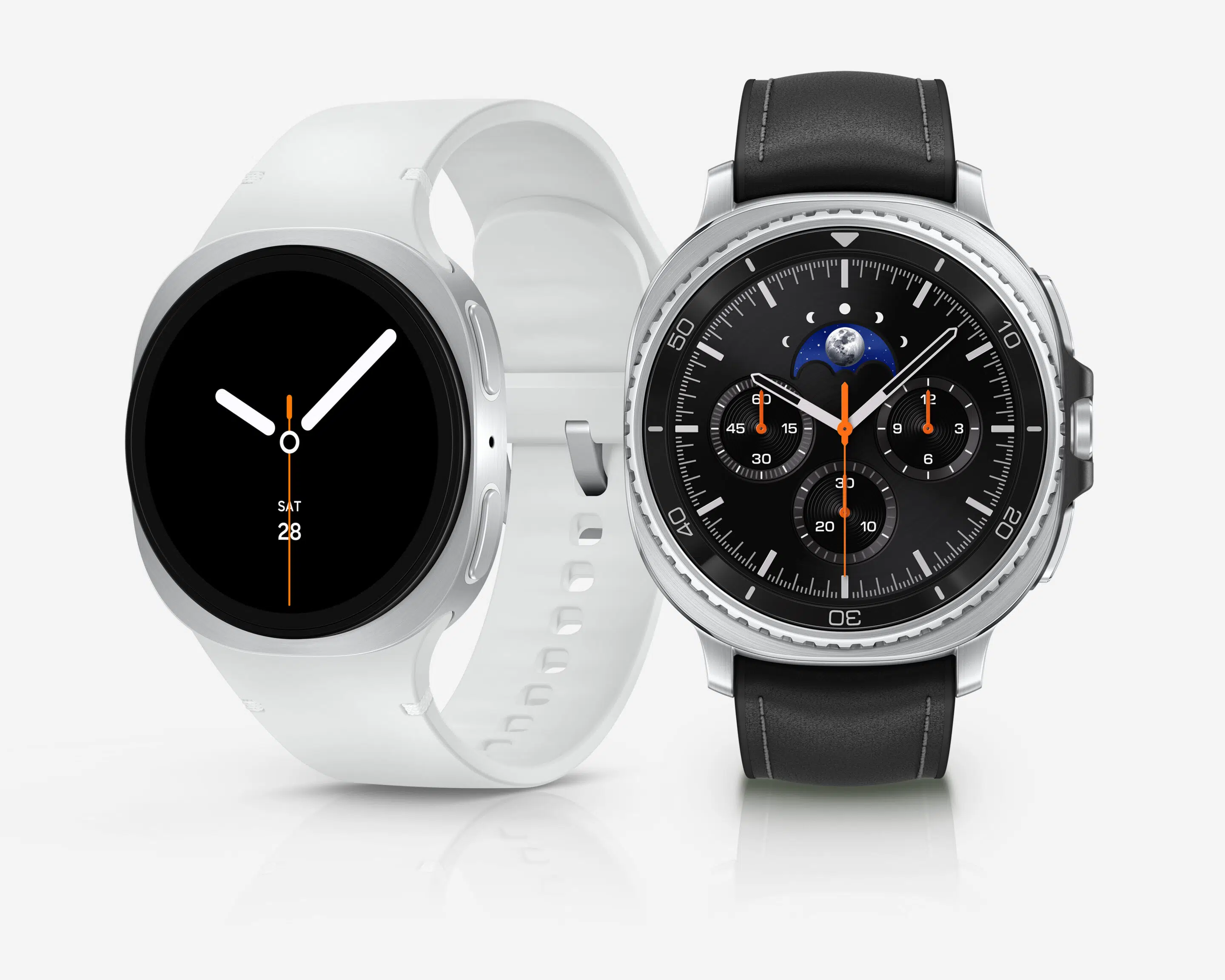
Versatile, powerful, comfortable, attractive, and durable. Simple to use. Stands alone or partners like besties. Packed with practical, meaningful capabilities. Two distinguished smartwatch designs for two distinct styles and scenes. The choice isn’t whether to buy, but which one(s), since S.O. needs one too, naturally.
Samsung Galaxy Watch 8 (standard) and Galaxy Watch 8 Classic are among Russell Cellular’s top-selling wearable smart devices. For one-on-one help, consult a friendly expert at your local Verizon store or call 1-800-221-4408 (business customers call 1-866-326-7548). These are some of their most popular features. (Note that deciding on a favorite could be difficult!)
Built‑In Galaxy AI and Google Gemini
One of the most talked‑about upgrades occurring in the Galaxy Watch 8 series is Google Gemini integration. This release allows users to interact naturally with their watches using voice commands.
With Gemini, you can:
- Ask questions in informal, everyday language
- Summarize messages and emails
- Start workouts, timers, and alarms hands‑free
- Control smart home devices directly from your wrist
This makes the Galaxy Watch 8 one of the smartest AI wearables available.
New Health Tracking Features You Won’t Find Elsewhere
Samsung introduced informative new health metrics that set the Watch 8 lineup apart.
The Antioxidant Index estimates carotenoid levels in your body, offering insight into nutrition and overall wellness – without cumbersome, tedious food logging. Simply place your thumb on the watch sensor for a few seconds to get a score.
Vascular Load tracks cardiovascular stress during sleep, helping users understand long‑term heart health rather than just daily heart‑rate fluctuations.
These tools make the Galaxy Watch 8 more than a fitness tracker – it’s a personal health assistant.
Advanced Sleep Coaching with Bedtime Guidance
Sleep tracking is a major focus of the Galaxy Watch 8 series.
The new Bedtime Guidance feature analyzes your recent sleep patterns and recommends an ideal bedtime window to improve sleep consistency, energy levels, and recovery.
If you struggle with irregular sleep schedules, this feature alone may justify upgrading.
Running Coach with Personalized Training Plans
Runners benefit from Samsung’s AI‑powered Running Coach. After a short assessment run, the watch assigns a fitness level and generates a customized multi‑week training plan.
Benefits include:
- Real‑time pacing advice
- Injury‑prevention guidance
- Post‑run performance summaries
It’s one of the most practical training features on any smartwatch today.
Independent Route Tracking via GPS
Samsung Galaxy Watch 8 features advanced built-in, dual-band GPS in both standard and Classic models. Planning, navigating, and tracking routes for workouts or recreational activities using Google Maps is a breeze and a boon for walkers, runners, skaters, drivers, explorers – basically anyone on the move.
Brighter Display and Slimmer Design than Previous Models
Both models feature a Super AMOLED display with up to 3,000 nits brightness, making them easy to read in direct sunlight.
Additional design upgrades include:
- Thinner case profile
- Lighter weight
- New cushion‑style “squircle” design that sits flatter on the wrist
This improves comfort during workouts and sleep.
Performance and Battery Life: Daily Recharge (Likely Still) Required
Both watches are powered by Samsung’s 3nm Exynos W1000 chip, offering smoother performance and better efficiency than previous generations. The Classic houses a slightly larger 445 mAH battery.
While battery life still averages one full day with heavy use (Samsung states 40-48 hours depending on use), optimization improvements in the Galaxy Watch 8 series make it more reliable for health tracking, GPS workouts, and AI features.
Galaxy Watch 8 Classic: Why It’s So Popular
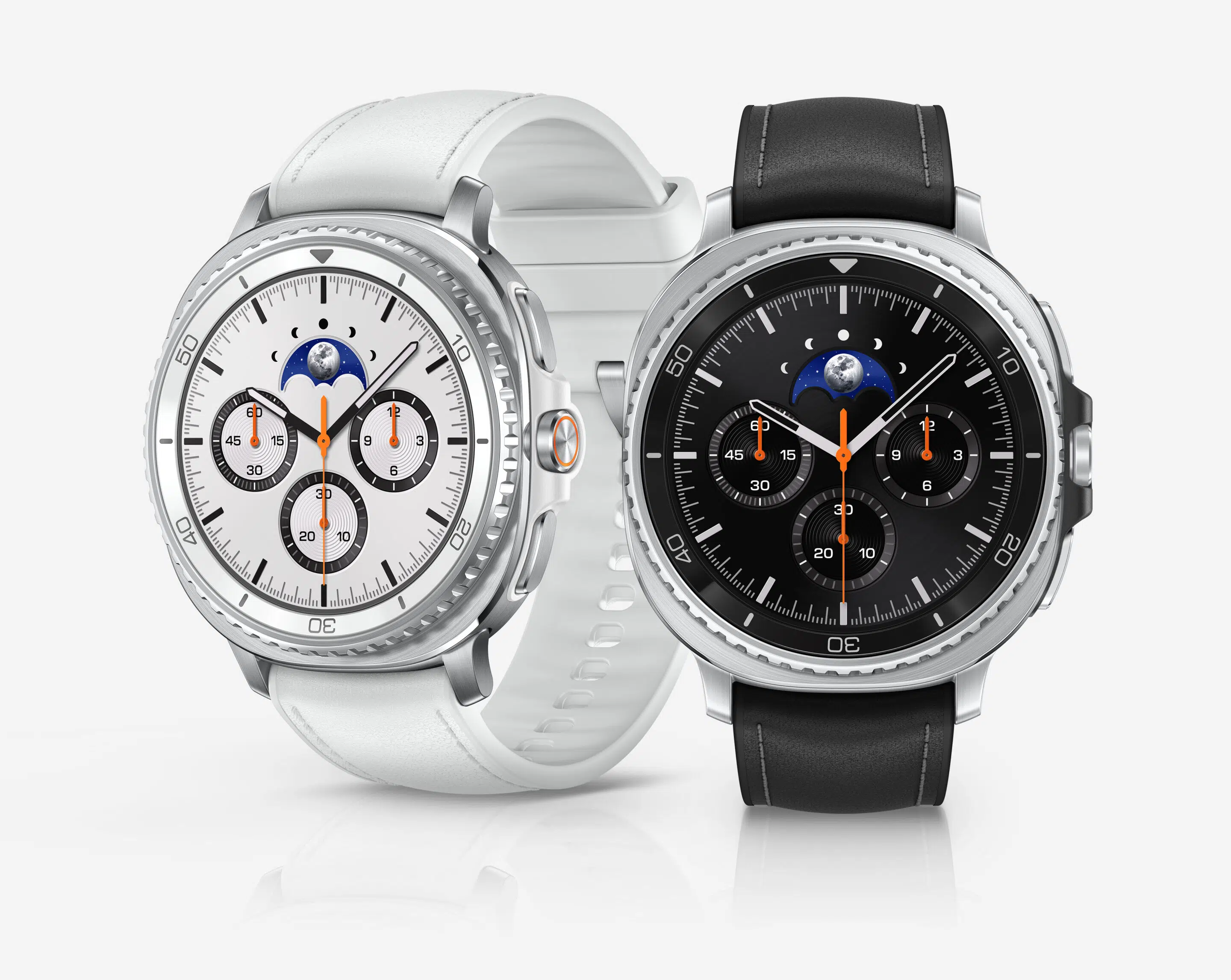
The Galaxy Watch 8 Classic stands out for one feature that fans begged Samsung to bring back: the rotating bezel. The steel bezel adds a layer of screen protection, while tactile navigation is even well-suited for gloves or wet hands.
Other Classic highlights include:
- Premium stainless‑steel build
- New Quick Button for fast access to workouts or features
If you want a smartwatch that feels like a traditional timepiece but performs like a modern fitness computer, the Classic model delivers.
Galaxy Watch 8 vs Watch 8 Classic: Which Should You Buy?
Choose the Galaxy Watch 8 if you want:
- A lighter, minimalist smartwatch that looks chic and is easy to sleep in
- Strong health tracking at a lower price
- All Galaxy AI features without extra bulk
- A lower MSRP than the Watch 8 Classic
Choose the Galaxy Watch 8 Classic if you want:
- A smartwatch with the premium look, feel, and durability of stainless steel
- A physical raised, rotating bezel for precise navigation and control
- A smartwatch that doubles as a classic watch
- Extra storage
Is Galaxy Watch 8 or Galaxy Watch 8 Classic Worth It? 
The Samsung Galaxy Watch 8 and Galaxy Watch 8 Classic consolidate purposeful upgrades to its legacy line-up, with AI‑driven health insights, best‑in‑class display brightness, and versatile designs. Samsung has set a new standard for Android smartwatches.
Whether you prioritize health analytics, fitness coaching, or aesthetic appeal, the Galaxy Watch 8 series offers a compelling reason to upgrade in 2026.
For those using a Galaxy Watch 5 or older, the Watch 8 is a significant upgrade in speed and display quality. For those enjoying the benefits of a Galaxy Watch 7, the upgrade is likely only necessary if you heavily prioritize maximum brightness and the latest AI features.
Samsung smartphone, tablet, and smartwatch owners often expand their Galaxy ecosystems by adding Galaxy Buds4 or Galaxy Buds4 Pro to the ensemble, enjoying even more immersive mobile connectivity. Many also make the wise choice of adding digital security and comprehensive coverage for all their digital devices through Verizon Mobile Protect. Get your groove on and savor peace of mind too!
___________________________________________________________________________________________________________________________________________________________________________
| Feature |
Galaxy Watch 8 |
Galaxy Watch 8 Classic |
| Design Style |
Modern, minimalist, lightweight |
Premium, traditional watch look |
| Case Material |
Aluminum frame |
Stainless steel frame |
| Available Sizes |
40mm, 44mm |
46mm |
| Rotating Bezel |
No |
Yes
(physical rotating bezel) |
| Display Type |
Super AMOLED |
Super AMOLED |
| Peak Brightness |
Up to 3,000 nits |
Up to 3,000 nits |
| Chipset |
Exynos W1000 (3nm) |
Exynos W1000 (3nm) |
| Operating System |
Wear OS with One UI Watch |
Wear OS with One UI Watch |
| Internal Storage |
32 GB |
64 GB |
| Galaxy AI / Google Gemini |
Yes |
Yes |
| Antioxidant Index |
Yes |
Yes |
| Vascular Load Monitoring |
Yes |
Yes |
| Sleep Tracking & Bedtime Guidance |
Advanced sleep coaching |
Advanced sleep coaching |
| Running Coach & Training Plans |
Yes |
Yes |
| Heart Rate, ECG, SpO₂, Stress |
All supported |
All supported |
| Quick Button |
No |
Yes |
| GPS & LTE Options |
GPS, Bluetooth & LTE models |
GPS, Bluetooth & LTE |
___________________________________________________________________________________________________________________________________________________________________________
Shopper FAQ: Galaxy Watch 8 and Galaxy Watch 8 Classic
Can you answer calls on Galaxy Watch 8?
Yes, you can answer, make, and reject phone calls directly on the Samsung Galaxy Watch 8 using its built-in microphone and speaker. It works via Bluetooth when connected to your phone, or independently on the LTE version. You can answer by swiping the green icon, using gestures, or making voice commands.
Can you text on a Galaxy Watch 8?
Yes, you can text on the Galaxy Watch 8 using the pre-installed Messages app to create new messages, view incoming ones, and send replies. Options include using a full on-screen keyboard, voice-to-text, or quick pre-written responses. The watch connects to your Galaxy phone via Bluetooth or LTE for messaging.
Can you make calls from a Samsung smartwatch without a phone?
Yes, Samsung Galaxy Watch 8 models are available with LTE/Cellular connectivity (which also have Bluetooth), meaning they can make and receive calls without a phone nearby. These models use an eSIM and a separate service plan (often shared with your phone) to operate independently. The Galaxy Watch 8 series is also available as Bluetooth-only models, meaning they require the phone to be nearby or connected via Wi-Fi for calling.
Can I leave my phone at home and use my Galaxy Watch?
Yes, you can use a Samsung Galaxy Watch without a phone, particularly LTE models. While you lose features like app downloads and some health tracking, you can still use step counting, alarms, and exercise tracking. Standalone use is ideal for exercise, allowing for phone-free music streaming and calling, provided the watch is activated on a cellular plan.
Can you install any apps on a Samsung watch?
Just like on your phone, you can install, customize, and uninstall apps on your smartwatch. Personalize your smartwatch to fit your needs and preferences using the Galaxy Wearable app on your phone.
Have More Questions? Call or Come See Us at Russell Cellular.
For one-on-one help, consult a friendly expert at your local Verizon store or call 1-800-221-4408 (business customers call 1-866-326-7548).
#Verizon #5G #LTE #Fiber #Samsung #GalaxyWatch8 #GalaxyWatch8Classic #SamsungProductReviews #GalaxyBuyersGuide #RussellCellular #BetterTogether
Read more RC blog articles.
Jul 7, 2026
Okay, fine – we technically made that up. But hear us out: the spirit of it is very real.
July is packed with official (and delightfully unofficial) observance days celebrating high‑tech innovations, big brains, creative self‑expression, and the glorious embrace of geek culture. It’s also the month where niche fandoms thrive, pop‑culture passions shine, and everyone is encouraged to wave their flag proudly – sometimes to cringe levels, always with enthusiasm.
In short? This month was made for us.
So, game on, knowledge nerds, brainiacs, creators, and tech‑enhanced revelers – GAME ON. Whether your appreciation comes in the form of content creation, curiosity-fueled learning, or scrolling way too deep into a hobby you “just discovered,” modern tech makes it all more mobile, more powerful, and more fun.
And yes, enjoy responsibly. (Battery life is finite. So is sleep.)
However you choose to celebrate – big or small, brilliant or mundane – remember: smartphones, tablets, smartwatches, earbuds, and fast connections make these passions easier to explore and easier to share. That’s where we come in.
Whether you visit a store or shop online, Russell Cellular has the devices, plans, protection, and connectivity to help you fully flex your interests this July and beyond. You can also get started by phone – just call 1-800-221-4408 for friendly help ordering! (Business customers call 1-866-326-7598.)
Mark Your (Digital) Calendars:
- 7/10 – Vlogging Day
Video blogging: for aspiring influencers, pros, and people who just figured out good lighting.
- 7/13 – Embrace Your Geekness Day
Whatever your wholesome weird thing is – lean all the way in.
- 7/15 – World Youth Skills Day
Computer skills count. Big time.
- 7/15 – National Be a Dork Day
Pocket protectors? Classic. Confidence? Inevitable.
- 7/16 – AI Appreciation Day
Have you seen what the latest smartphones can do?
- 7/17 – World Emoji Day
Modern hieroglyphics, now with better cameras.
- 7/19 – World Photography Day
Again…have you seen the cameras on today’s phones?
- 7/20 – National Radio Day
Have you heard your jams through the latest earbuds?
- 7/22 – World Brain Day
Feed your head something nutritious – or at least interesting.
- 7/31 – World Distance Learning Day
New skills, new perspectives, zero commute.
All of this tech‑centric celebrating shares space with July’s biggest heavy hitter: Independence Day. While fireworks and parades may steal the spotlight, they coexist nicely with quieter celebrations of innovation, education, creativity, teamwork, tolerance, and self‑expression. They are cornerstones of our collective story and our values, powered forward by technology every day.
Big gorillas can share the jungle. We’re cool with that. That’s no reason not to acknowledge how modern, mobile technology supports hobbies and everyday passions!

Power Your Passions with Smart Devices on Verizon’s 5G Network
Ready to elevate how you create, learn, explore, and connect? Start your journey with Russell Cellular. From cutting‑edge devices and reliable mobile plans to wireless broadband, fiber optic home internet, and device protection, we’re here to find the right solution for every customer – every time.
July is your excuse to geek out. We’ll make sure you’ve got the tech to do it right.
#Verizon #5G #LTE #Fiber #FunTechHolidays #GeekCultureEventsAndDays #TechnologyForCreatorsAndLearners #RussellCellular #BetterTogether #TechAppreciation
Read more RC blog articles.
Jun 19, 2026
Together These Features Make Smart Gadget Magic!
Smartphones, tablets, and smartwatches have become our all‑in‑one companions – communication tools, creative studios, and entertainment hubs. Of all their features, three shape our daily lives the most: social media, cameras, and music. Each brings its own kind of magic, turning our devices into personal portals for connection, creativity, and joy. The modern mobile lifestyle would look very different without this special threesome.
June even celebrates these favorites with a trio of fun observances:
- June 21, 2026 – World Day of Music
- June 29 – National Camera Day
- June 30 – Social Media Day
TURN IT UP: Beats for Every Vibe – No Wires, No Worries
Music is personal, and mobile devices make it more portable and customizable than ever. A strong signal – like Verizon’s 5G and 5G Ultra-Wideband – keeps streaming smooth so millions of songs are always at our fingertips. Whether we need focus, motivation, or chill time, the perfect playlist is just a tap away.
Streaming platforms help us discover new artists, revisit old favorites, and explore genres we might never stumble upon otherwise. And for aspiring creators, music‑making apps turn phones into pocket studios where anyone can compose, record, and share their sound. Plenty of rising stars have launched careers with nothing more than a smartphone and some creativity.
From workouts to commutes to quiet evenings, our devices deliver the soundtrack. Whose music lifts your mood – maybe even your own?
FOCAL POINT: Smart Cameras Capture Life & Spark Creativity
The smartphone camera is easily one of the most transformative inventions of the last 20 years. What once required pricey gear is now accessible to anyone. With today’s AI‑powered tech, both the shots we take and the edits we make look better than ever.
From big milestones to everyday beauty, our cameras help us save memories effortlessly. Editing tools, filters, and creative apps turn our phones into portable studios where we can refine, enhance, and share our visual stories. Original content creation is one of the main drivers behind how people use smartphones today.
Smartphone cameras have also fueled the rise of the citizen journalist, giving everyday people the power to document events in real time. Sometimes that means spreading joy, sometimes it means making a difference – but it always means more voices being heard.
What a time to be alive, and to capture it all.

SOCIAL SCENERY: Staying Connected with Everyone (Even Cousin Eddie)
Social media may be complicated, but its benefits are undeniable. It keeps us connected across states, countries, and time zones, letting us share life’s moments instantly. Without it, our photos, videos, and conversations with “our people” would be far less frequent – and far less fun.
It’s also a massive learning hub. From DIY hacks to science explainers, social platforms double as classrooms. Niche communities – whether you’re into vintage instruments or urban gardening – thrive online in ways they never could locally.
Smartphones and social media together have become modern lifelines, keeping us informed, inspired, and connected.
GREAT COMBO: Sharing the Love the Modern Mobile Way
With high‑tech cameras, endless music, and social media at our fingertips, our devices have become creative canvases, social bridges, and personal soundtracks. They help us stay grounded in what matters most: connection, creativity, and joy.
Russell Cellular, an authorized Verizon retailer, is here to make sure your wireless experience is the best it can be. Visit a location or shop online for great deals on the best-performing, easiest-to-use smartphones for music, cameras, and social media. You can also call 1-800-221-4408 for friendly help (business customers call 1-866-326-7549).
And just in case no one else says it – Happy World Day of Music, National Camera Day, and Social Media Day. Don’t party too hard!
#Verizon #5G #LTE #Fiber #WorldDayOfMusic #NationalCameraDay #SocialMediaDay #MobileCreativityTools #MusicStreamingOnMobileDevices #RussellCellular #BetterTogether
Check out more RC blog articles.